Announcements:

I am currently writing at Computelogy.com actively and that's why i sort of abandoned my own tech blog. Since i am too busy to be taking care of both sides, i guess this blog will go into hibernation for a very very long time. Regrettable, but then it's hard to come up with new posts & stuffs.

So once again, i am now writing actively at Computelogy. Feel free to visit there and enjoy our latest articles and posts!

November 30, 2009

Guardian Password Manager, a brand new Password Manager Software from Davide Vitelaru


Having your username and passwords leaked to others is already a bad thing to happen, but to have your own username and password forgotten, that was just downright embarrassing. That's why having a password manager is quite the important stuffs for users who frequently register for websites, have lots of accounts and are either very forgetful or being too varied with their passwords.


I've been using a password manager called Password Memory which serve me well with its database-like management, but i found another similar tool which works just as well. It is called Guardian Password Manager, developed by an independent developer called Davide Vitelaru.


With Guardian Password Manager: you can store all your passwords, so you won't have to remember them all. In case security is your problem, and you do not one anyone to break into you accounts, Guardian also has a password generator that can create you a completely customizable random password, so that nobody can hack into your accounts unless he has your Guardian Password Manager account's password.


Guardian Password Manager is also equipped with a backup and backup restoration module, where users can backup their password database to a specific location and restore it when necessary. This feature is quite the necessary tool for users who frequently reformat their computer or need to transfer their password database to another computer.


Overall, Guardian Password Manager is simple & easy to use, is stable and working and as a GUI fan, i think its interface is also well-designed and very updated-looking. Guardian Password Manager works on Windows XP, Vista and 7 and can be used for both personal and commercial purposes.

Download Davide Vitelaru's Guardian Password Manager now.

For tutorials on how to use Guardian Password Manager, you can refer to this Online Help File, which is also accessible from the main GUI of the software itself.
Read more >>

November 26, 2009

Get Free Serif Digital Scrapbook Artist Compact v1.5.0.51


I have never ever used any scrapbook software. This means I can not say a single word about the work of Serif Digital Scrapbook Artist Compact. But they say:

Key features

Scrapbook essentials
    * Themes and Digikits
    * Scrapbook page sizes
    * Cutting, erasing, and adding to items
    * Design, print, and upload in high-resolution
    * Layer work made easy
    * Share via website
Ease of use
    * Total ease of use
    * Context toolbars
    * Design aids
Photos
    * Adding photos
    * Photo retouching
    * Cropping and fitting photos to frames
Brushes
    * Realistic brush strokes
·         Natural brush strokes
·         Spray brush strokes
Drawing
    * Design Inspiration
    * QuickShapes
    * Copy fills and effects between objects!
    * Artistic and shape text
    * Color and transparency control
    * Filter effects
    * Astounding 3D lighting and surface effects
Sharing
    * Email scrapbook images to friends and family
      Send your scrapbook as Adobe Acrobat PDF* and the popular JPEG format—or simply email your .sbp file!
and some other fun things to aid scrapbooking...


Grab It:
This is a Computeractive promotion published in Computeractive Magazine, today, 26-Nov-2009. Not a lengthy procedure. Just open the following URL into your browser (URL copy n paste) and download Serif Digital Scrapbook Artist Compact free of cost. It does not need any license or registration.

http://www.computeractive.co.uk/dsa/index

After installation, when you will download the updates of latest version 1.5.1.52, it may trick you to Upgrade to full version. Before installing updates, it will ask you to upgrade, simply close upgrade and updates installation will continue. You will get the latest v1.5.1.52. Enjoy it.


I tried to install it twice on windows 7 but both time I got BSoD. I installed it on XP Pro x86 and did not face any problem.
Read more >>

November 25, 2009

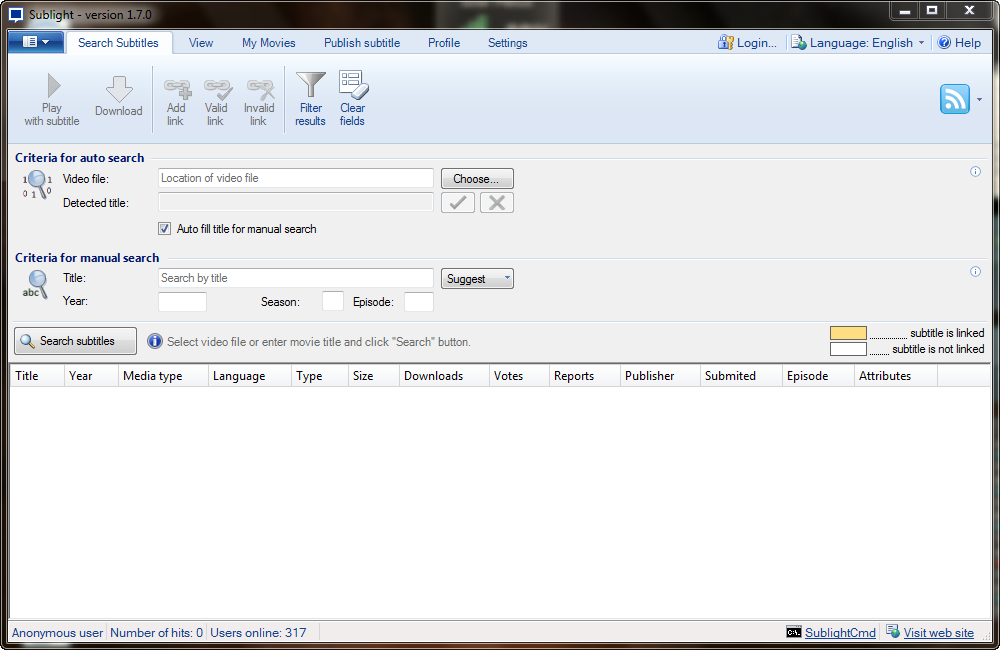
Download Subtitles For Your Movies with Sublight


Just a week ago, one of my younger cousin had serious troubles with her PC and I offered myself in sorting it out. Afraid of her being bored with my technical procedures, i think i might as well share one of my movies with her. However, she complaint of the lack of subtitles from the movie, which does not make her movie-viewing experience enjoyable; this is due to the fact that the movie was shared on a notebook with inferior speakers and the conversations in the movie being too fast to catch.

I decided to solve this problem before the upcoming Christmas gathering, where i promised to show her the movie again, this time with subtitles. Well, finding any usable Subtitle downloader is easy but it took me quite a while to find the best subtitle downloader available and it is called Sublight.

Sublight is a free subtitle downloader and search engine developed by Sublight Labs, which is extremely stable, easy to use and convenient as well. One of its powerful feature is the ability to support over 46 subtitle languages, making it a compatible subtitle downloader for virtually anybody regardless of race or primary languages.

Here's how Sublight Works:

1. To start off with an existing movie, users have to tell Sublight where their movie is located in the hard disk.

2. After directing Sublight to the movie file, Sublight will immediately retrieve relevant subtitles for users to download


3. Users choose from a list of subtitles to download. Once the subtitles are downloaded, the movie playback will immediately begin.

Here's what happened when subtitles are downloaded and played along with the movie file. I tested this file on my Ratatouille movie file which is pretty much working:


Well, its kind of true that we shouldn't be picky about what we eat...obviously, but for software, being picky is nothing less than important (software is much more complicated than food, anyway...). I'm glad of being picky over a simple subtitle downloader because at the end of the day, Sublight is working fantastically as a subtitle downloader and it is the best in conveniently suiting my needs.

Dowload Sublight now, or visit the Sublight Labs official site for more information.

Note: Sublight Labs is now in the middle of developing Sublight v2 beta, so if you're interested in their development, make sure you keep tabs on their progress from time to time!
Read more >>

Bring the Windows 7 Gadget Feature to XP and Vista with Thoosje Sevenbar

If i remember correctly, i used to share in my blog nearly a year ago about Thoosje Sidebar, a cool freeware where users get to either add a Windows Sidebar to XP or replace the default Sidebar in Windows Vista. That being said, now that Windows 7 is available in retail outlets, users might be desperate to have Windows 7's gadget platform instead of Sidebar on their machine.


It happens so that Thoosje had developed a new freeware named Thoosje Sevenbar way back in late August 2009, even before the official launch of Windows 7. Thi little freeware runs best on Windows XP, Vista and 7, though i think we'd pass on using it on Windows 7 as its functionality with Thoosje's are nearly the same. Like the default Windows 7 gadget platform, Thoosje Sevenbar allows users to place gadgets everywhere on the desktop and meanwhile, eliminating the Sidebar Toggle feature used in the default Vista Sidebar and the old Thoosje Sidebar (where users can toggle the sidebar to show hidden gadgets). Other than that, Thoosje Sevenbar runs just like good old Thoosje Sidebar. 


 Thoosje Sevenbar's Gadgets Properties, showing more gadgets compared to the older Thoosje Sidebar


According to Thoosje.com, the new Sevenbar uses 50% less memory and runs faster than the default Sidebar. In the process of writing this post, i downloaded and tested the Thoosje Sevenbar and Thoosje are not lying about these claimed features. Thoosje Sevenbar uses extremely less memory if compared to the older Thoosje Sidebar, while it actually runs as fast as the default Windows 7 gadget platform, and run much faster than the default Vista Sidebar. But i am slightly disappointed to learn that Sevenbar is quite taxing on user's CPU; a problem Thoosje never solve since the Thoosje Sidebar days.


Extreme Contrast: Thoosje Sevenbar uses less memory than the older Thoosje Sidebar, but the CPU utilization is quite high


All in all, this freeware customization tool is still a nice alternative for users with a PC with powerful CPU speed searching for replacements to their Sidebar.


Download Thoosje Sevenbar now, or visit their official Sevenbar site for more information.

Read more >>

November 21, 2009

Get Free SystemUp® Tuning 2009 (Genuine) (Save 40-EUR)

It looks like no company wanted you go disappointed. By one way or other they wanna give your their products. Sometime at very low prices that even hard to imagine and sometime free of cost forcing us die with happiness. Now it is the time to Grab Free SystemUp® Tuning 2009 and save 40-EUR.


SystemUp® Tuning 2009 is a German product made by ZoneLINK. SystemUp Tuning is really a huge software whose installer is of 48MB. The disk space required is 88MB. During its working the RAM usage is around 45MB but it also depends upon the task.

10 Convincing Reasons for SystemUp Tuning 2009

  1. Increasing the efficiency of PCs and notebooks is as easy as never before


  2. Helps with Windows and system problems


  3. System analysis with optimization suggestions


  4. Profiles or individual performance adjustment


  5. Professional hard disk cleanup and acceleration


  6. High-performance 3-step defragmentation for improved loading times and maximum performance gain for all data mediums


  7. Secure deletion of files, directories and removal of data garbage


  8. Undelete module for data recovery


  9. Automatic optimization of many areas of your system


  10. Helpful wizards for most of the program module


Grab It:
This is a CHIP magazine promotion. They published the license in their magazine. This means this is legal license (may be not for every body). Here is license:  
5CA5C-FDF39-1253B-F392E-D158D.

Download SystemUp® Tuning 2009 from the following webpage (URL copy n paste). Install it and use the license to register it.

http://www.zonelink.de/index.php?page=Product&name=29

You can register it with any name. Enjoy one more gift. Below is proof.


Read more >>

Microsoft launched Fishbowl, a Silverlight-Powered, Desktop-Based Facebook Client


I've been following news regarding the annually-held Professional Developers Conference (PDC), where this year Microsoft really debuted tonnes of stuffs, from the latest news on Internet Explorer 9, Windows Azure, Microsoft .NET 4, the newly unveiled Silverlight 4 and then...Fishbowl, a Facebook Client!


It sounded pretty unusual that Microsoft would even spend precious time & resources in developing something like this but hey, they must be Facebook fans as well! After their preview of the upcoming Silverlight 4,
they demoed Fishbowl, which is now officially available for download. Not only does Fishbowl provide a nice, clean display of your stream, but Fishbowl stand out as a better Facebook client than any other applications because it is packed with excellent stability & features (some not even available on Facebook itself), is pretty responsive (even more so if you have a high-end machine), and extremely intuitive to use.


Although Fishbowl supports the 32-bit version of Windows XP and both the 32 & 64-bit of Vista and 7, Microsoft has stated that the application is designed best for Windows 7, and it's no wonder why. Yes, Windows 7 is the latest OS released by the corporation from Redmond, but its features notably the Windows 7 taskbar with jumplist (as shown in the image below) and Aero Peek, gives Fishbowl an edge in terms of design & usage over XP and Vista. Most importantly, Fishbowl is designed to be touch-screen supported, meaning that users of Windows 7 can literally control Facebook using their fingers!


Some of Fishbowl's best features I immediately noticed is the way it lets you explore photos & friends' pages. Pick an album/friend to browse, then flip through the images/friends list using your mouse's scroll wheel. Zoom is also supported (you can zoon in and out anytime!), and you can also print or save images (or an entire album) in a single click. There's even a full screen Slideshow Mode for hands-free viewing. As for uploading your own images, the drag-and-drop feature heavily used in Windows makes uploading an almost-too-easy task with Fishbowl.


However, if you've gotten used to browsing Facebook using Firefox, Chrome, Opera or any other relatively unknown browser, be prepared for some slow speed, because Fishbowl is probably using IE8's rendering engine (it's Microsoft's product, after all), so opening external web content is going to feel slow. Also, Fishbowl is notably slow at rendering walls on profile pages, which sort of showed off Silverlight's weakness.There are options for users to change the color of the application, but then the color choices are limited (though it looks good) if you're a hardcore customizor, anyway.

To conclude all, if you're a user of Microsoft Windows XP & above, a Facebook user and a hardcore photo-sharing and status-updating person, then Fishbowl's the right tool for you!

Visit Fishbowl's official website here.
Read more >>

November 19, 2009

Get Free Online Armor Premium Firewall v4.0 (Genuine) (Save $20)


Here we go. Now here is a new promo for CHIP MAGAZINE READER. But every body can access it because the registration page is accessible through Google search.

You know about Online Armor Premium Firewall. It is better than many paid firewalls. So do not be lazy and get your personal license in your early leisure. First what they say about Online Armor Premium Firewall v4.0:

  • Online Banking Mode
  • Kernel Mode Security
  • Automatic Updates
  • Web Shield
  • Mail Shield
  • Phishing Filter
  • Execution Protection
  • Termination Protection
  • Autostart Protection
  • Firewall
  • Standard Mode
  • Advanced Mode
  • Keylogger Detection
  • Import/Export Settings
  • Tamper Protection
  • Transparent Blocking
  • DNS Spoofing Protection
  • Support
  • Script/Worm protection
  • Program Guard

 Grab it:
1: Open the following URL into your browser (URL copy n paste). Fill a simple form with your name in first text box and email in second test box. Submit it and within 5 seconds you will get your free genuine license of Online Armor Premium Firewall v4.0.

http://www.tallemu.de/promo_chip0912_2.php


2: Check your email and you will have an email from Tallemu subject Ihre kostenlose Lizenz von Online Armor Firewall. Follow the following snap to find your license in email which you received.


3: Download Online Armor Premium Firewall v4.0 from the following webpage (URL copy n paste).

http://dl1.online-armor.com/downloads/OnlineArmor_Setup.exe

Enjoy your one new license of Online Armor Premium Firewall v4.0. Do not forget to activate it within 30 days of license arrival.
Read more >>

Get Free O&O DriveLED 3 (Genuine) (Save 30$)


Chip.de is offering  full version of O&O DriveLED 3 in German language but the good thing is same license can be used on O&O DriveLED 3 (Eng). First of all few highlights of O&O DriveLED 3:


*Display of read/write access for logical volumes

*Display of current storage capacity on logical drives

*Automatic monitoring of all S.M.A.R.T. properties
*Display of current temperatures on all hard disk drives (when supported by manufacturer)

*Prognosis of remaining operational life for all hard disk drives

*Self tests run directly in Windows without the creation of a boot disk!

*Warning notification of possible operational errors on all hard disk drives
*Support of all Windows-compatible storage volumes

*Support of SCSI-disk drives


Grab It:

1: Open the following URL into your browser (URL copy n paste) and fill a short form. The form is in German language so follow snap P1 for guaidance. After filling form, submit it. On the next page you will see a message in German language telling you that you will get your free personal license soon. You will get it in 5 minutes.

http://www.oo-software.com/home/de/special/driveled/


2: Find email from O&O in your inbox or Spam folder. The subject of email will be Ihre Lizenz von O&O DriveLED 3. Find the part of email containing your registration infos. Follow snap P2 for guidance.


3: Download the O&O DriveLED from the following URL (URL copy n paste). The installer is in English.


http://dl.filekicker.com/send/file/227394-7I66/OODriveLED3Enu.exe


4: After installation, at first run, you will be asked to enter your license info. Read Step 2 again to locate your license. Register it and enjoy. Follow the following snap to find where to fill what during registration.


Chip.de promotion page can be found here (URL copy n paste):
http://www.chip.de/downloads/Vollversion-DriveLED_13013880.html

More info on O&O DriveLED 3 can be found here (URL copy n paste):
http://www.oo-software.com/home/en/products/oodriveled/index.html
Enjoy it.
Read more >>

Review Digital Plexus

I do not know how well this blog is doing unless there are feedbacks. Please do leave a review or two with us on how you think about Digital Plexus, its authors or the qualities of the posts. Good and bad comments are all welcomed, but please avoid posting rude/obscene comments that are not helpful to any of us working on this blog:

Disclaimer:

This blog is dedicated for the benefits of those who seeks experiences, knowledge or information in the computer, IT news, technology and software & hardware area. Digital Plexus cannot control how readers use the information, including any fraudulent conducts, illegal activities or deeds as regard by the law. Therefore, Digital Plexus & its authors shall not be liable to any damages caused by readers who misuse the information provided.

Digital Plexus utilizes information from many sources, including personal experiences of authors. Digital Plexus will never claim credits or ownership rights regarding the information it used in the blog, except for the raw articles posted on the blog - those are original materials written by the authors of Digital Plexus itself after the compilation of various information and/or experiences.

Followers

  © Blogger templates 'Neuronic' by Ourblogtemplates.com 2008

Back to TOP