Announcements:

I am currently writing at Computelogy.com actively and that's why i sort of abandoned my own tech blog. Since i am too busy to be taking care of both sides, i guess this blog will go into hibernation for a very very long time. Regrettable, but then it's hard to come up with new posts & stuffs.

So once again, i am now writing actively at Computelogy. Feel free to visit there and enjoy our latest articles and posts!

Showing posts with label Hardware. Show all posts

March 3, 2010

NVIDIA ION 2: Coming Soon To Netbooks In April!

Folks who want to buy a netbook fitted with NVIDIA graphic processing unit (GPU) in the coming days, weeks or months, please hold up! Asking for you to delay your purchase has its reason: NVIDIA has finally released an announcement on its upcoming next-generation graphic card technology, collectively known as NVIDIA ION v2, due this coming April!


You may wonder what's so special about this upcoming hardware release from NVIDIA. The reason is simple: it is a pretty significant upgrade over contemporary NVIDIA graphic cards you see in the current market, even its predecessor, the NVIDIA ION 1st generation. The biggest difference between the ION 1st generation and the upcoming 2nd generation is that while ION 1 is a combine Northbridge/GPU chipset, the ION 2 is instead, a standalone, independent GPU.


According to the official NVIDIA ION website, NVIDIA ION 2 is developed to be media-savvy, which was supported by statements on which they claim the new ION graphic card can perform lots of media-intensive jobs such as support full 1080p video streaming on Youtube, Blu-Ray disc etc, accelerate popular video and music applications and enhance modern games' gaming experience such as World of Warcraft. 


If you take the above chart as reference, NVIDIA ION easily supercharges netbooks into the ranks of notebooks and desktop. The NVIDIA ION 2 boast a performance of ten times the performance of integrated graphic card, while Windows 7 Home Premium will be the platform on which the NVIDIA ION 2 is run.

However, the interesting news is offered to those netbook fans: NVIDIA ION 2-powered netbooks have integrated NVIDIA Optimus Technology, the solution for common weaknesses of netbooks, which are regarding short battery lifespan and inferior performance compared to desktop rigs or contemporary notebooks. What NVIDIA Optimus Technology offers is the ability to automatically and intelligently manage battery life and performance; a very compelling feature for novice users who does not know how to manually configure their netbooks to optimize performance and battery life.


Here are a summary of how the NVIDIA ION integrated into metbooks will work:


1. Optimus powers down the GPU for basic tasks like web surfing, further extending battery life. Likewise, when more graphic processing is needed for playing graphic-intensive games, streaming videos, or using GPU-compliant applications (for example, Adobe Photoshop), Optimus automatically activates the ION GPU.

2.  No user interaction is required for NVIDIA ION to work: Optimus seamlessly figures out how to best optimize the users' notebook computing experience.

NVIDIA ION's official website listed two netbooks: the Acer Aspire One 532G and the ASUS EEE PC 1201 PN as the first to-be-released netbooks in the market to run the much anticipated NVIDIA ION GPU fitted with Optimus Technology. And it's not just this two product: more than 30 product featuring NVIDIA ION & Optimus Technology are due to debut in the market ranging from desktops to motherboard manufacturers and add-in cards. The first batch of ION 2-powered ASUS EEE PC 1201 PN will go live on sale on April 2010, as well as the 30 different products.

Of course, at the end of the day, this is good news to those who wanted a netbook. Small, lightweight and now with NVIDIA ION 2, netbook can now officially share the same ability as notebooks and desktops in enjoying hi-def media streamings and gaming. Previously, netbook is bad at media-related stuffs and gaming, yet NVIDIA ION's the only thing that will make enjoying media and gaming on netbooks enjoyable. Therefore, if you are thinking about a long-term investment in netbooks, do just held back until April 2010...when the first NVIDIA ION 2-powered product hits the market. It is worth the wait and the money!

*Thanks to eweek.com, engadget,com and the official NVIDIA ION website for the information and pictures.
Read more >>

November 19, 2009

Get Free O&O DriveLED 3 (Genuine) (Save 30$)


Chip.de is offering  full version of O&O DriveLED 3 in German language but the good thing is same license can be used on O&O DriveLED 3 (Eng). First of all few highlights of O&O DriveLED 3:


*Display of read/write access for logical volumes

*Display of current storage capacity on logical drives

*Automatic monitoring of all S.M.A.R.T. properties
*Display of current temperatures on all hard disk drives (when supported by manufacturer)

*Prognosis of remaining operational life for all hard disk drives

*Self tests run directly in Windows without the creation of a boot disk!

*Warning notification of possible operational errors on all hard disk drives
*Support of all Windows-compatible storage volumes

*Support of SCSI-disk drives


Grab It:

1: Open the following URL into your browser (URL copy n paste) and fill a short form. The form is in German language so follow snap P1 for guaidance. After filling form, submit it. On the next page you will see a message in German language telling you that you will get your free personal license soon. You will get it in 5 minutes.

http://www.oo-software.com/home/de/special/driveled/


2: Find email from O&O in your inbox or Spam folder. The subject of email will be Ihre Lizenz von O&O DriveLED 3. Find the part of email containing your registration infos. Follow snap P2 for guidance.


3: Download the O&O DriveLED from the following URL (URL copy n paste). The installer is in English.


http://dl.filekicker.com/send/file/227394-7I66/OODriveLED3Enu.exe


4: After installation, at first run, you will be asked to enter your license info. Read Step 2 again to locate your license. Register it and enjoy. Follow the following snap to find where to fill what during registration.


Chip.de promotion page can be found here (URL copy n paste):
http://www.chip.de/downloads/Vollversion-DriveLED_13013880.html

More info on O&O DriveLED 3 can be found here (URL copy n paste):
http://www.oo-software.com/home/en/products/oodriveled/index.html
Enjoy it.
Read more >>

Internet Explorer 9 Revealed (Still In Development Phase, Though!)


 Internet Explorer 9 has officially been unveiled today at the annually-held Professional Developers Conference (PDC). In fact, as this article is being published here, attendants and speakers on the PDC conference are still talking about IE9 and other tech advances. You can check out the discussions yourself at the Microsoft's PDC2009 website.

We all know what Microsoft should do with IE9, and apparently their goals with IE9 is pretty much the same as we are since they are pretty obviously heading into the right direction. From the graphs shown in their presentation during the PDC, IE9 is depicted as faster, with more standards-compliant website rendering. The test is based on Webkit.org's SunSpider test, a browser testing site very commonly used for benchmarking browser performance. For a browser which is barely three weeks into development, that is really some achievement. 


According to them, they're also including 'hardware accelerated' rendering using Direct Write and Direct 2D, along with users' graphics card with the aid of DirectX D2D technology. This means that whether you're trying to do CSS3, Javascript or DHTML, IE9 should render things much faster. Stephen Sinofsky mentioned that one particularly impressive rendering showed how with the existing browser, Bing Maps could render a map at about 13-14 frames per second;  but using hardware acceleration,  it was running at 60 frames per second. We're talking about a new browser which performance is tripling its predecessors!


In other words, Internet Explorer 9 will be the first-ever browser to utilize both hardware and software to render its performance. So long your PC's graphic cards are high-end, you can literally expect IE9 to fly. Sweet, isn't it (pray that it wouldn't come out as a disappointment, though)?


As mentioned that IE9 is only three weeks old, we shouldn't be expecting its launch in the near future but then as Sinofsky mentioned, there's still lots of works to do. I think most of us would pretty much be willing to wait for Sinofsky's team to fully develop the new browser, wouldn't we?

Read more >>

September 14, 2009

Recover Lost Partitions with Partition Find & Mount

Luckily, I never faced such problem where I lost any partition. The reason is I am always careful when working on my laptop. But you may have suffered such problem when you lost your partition because of multiple reasons and you may have also suffered your precious data lost. It always happen when you finger your computer improperly. LOL.

There are many commercial software available which can help you in recovery of your lost partition. The matter is you have to pay for such commercial software. Freewares are not so common and if available, it is difficult to find a good one. The reason is we do not care about freewares because we did not spend any penny. If you use some freeware, a simple email encourage them to work more and to provide you same quality software which are available for money. Make this habit, if you use any freeware, encourage them by writing them and spreading words about them. Also try to identify the bugs you find in freeware so than you can get bug-free release next time.

Partition Find & Mount is available in two categories: Free and Paid. I will not talk about paid one because it is out of scope. Partition Find & Mount (Freeware for personal use) is a very nice little handy tool which can recover your lost partition. Your Master Boot Record (MBR) is missing, damaged or over-written because of any reason, if your hard disk is not damaged, Partition Find & Mound will work like any other commercial software. This is a MUST HAVE UTILITY which you may need any time. The one reason it may not work is if your file system is badly damaged and in irrecoverable condition.

There are three methods available to find any lost partition:
1. Fast intellectual scan
Fast intellectual scan works best if the drive is repartitioned or if MBR is the only structure that is damaged. The specific of this method is the following: when a valid partition is found, the process automatically resumes from the end of the found partition. This greately improves the speed of the process. Scanning the whole hard drive using this method takes just seconds.
2. Normal scan
While scanning with Normal Scan option, Partition Find and Mount checks all areas of the disk where standard partitioning tools are allowed to place the beginning of a partition. An example of a standard partitioning tool is the Windows Disk Manager.
3. Thorough scan
Thorough scan will look into every sector of the drive while searching for valid partitions. This is the most complete method and it can take up to several hours to complete.

At the end of scan, a list of found partition will be displayed in Partition Find & Mount. Simply add found partition into system and assign it a name for your convenience. You can create binary image a found partition as well as the whole hard disk. Create Image button can be used for this purpose. NTFS and FAT file systems are fully supported. In free version, data transfer is limited to 512KB (KiloBytes). The Supported Operating Systems are Windows Vista 32-bit, Windows XP, Windows 2003, Windows 2000.

Open the following webpage to access Partition Find & Mound (copy n paste):
http://findandmount.com/
Read more >>

August 15, 2009

Kingston's Brand New Data Traveller 300 USB Flash Drive


When external storage devices are on the rise in PC markets, i had a feeling that the once-dominant source of portable storage, the USB drive, is going to be degraded. My doubts are pretty justified as well; even the lowest standard of external hard drives have a capacity of up to a hundred GB, while a better-designed external hard drive offers more, with the additional benefits of higher file transfer rate per second. I thought that people would still prefer flash drive at the end of the day but no; they do not really care about the more bulky size of the external hard disk...in fact, the generally smaller capacity of USB flash drive in addition to its lower data transfer rate is the reason why some users turn their back on it.

Users are no longer just storing something simple in their storage devices such as a document, a picture, or an audio file. They carry a full collection of games & software installers, videos & movies, which are massive in size. If a movie has a file size of more than 1 GB, imagine those users with a passion for collecting movies; they would need literally dozens of USB flash drives in order to contain those files!

Regardless of its downside, you can't deny that flash drive is still much more portable than an external hard disk. Which is why i believe they will never die in the market...at least if research and development continues, which Kingston Technology Company did.

Kingston Technology Company, a UK company famous for supplying memory-based hardware, delivered the world’s first ever 256 GB USB Flash Drive that possesses the highest capacity available in the market.

Kingston Data Traveler 300's capability of storing 256 GB of data superseded Kingston USB Flash Drive's previous highest storage volume at 126 GB. In addition to the high capacity, the new flash drive comes with a newly-designed Password Traveler software, meaning that your precious data can be password protected at will. It allows you to create and access a password protected, secure area of the drive called a “Privacy Zone”, which can take up to 90% of the drives capacity.

In case you're wondering who suits DataTraveler 300, this USB flash drive is perfect for those looking for both significant storage capacity and data protection in a lightweight, durable design. Data Traveler 300 is made up of a retractable USB connector and reinforced lanyard/ key-ring hole – the entire structure is built to withstand daily use like normal USB flash drives. The USB drive supports data transfer speeds of upto 20MB/sec read and 10MB/sec write. It can also be used for Windows Vista & Windows 7's ReadyBoost.

This is what Kingston estimated that the 256 GB flash drive will do for you in terms of storage:

  • 10 Blu-ray discs (~25 GB each)
  • 54 DVD discs (~4.7 GB each)
  • 365 CD discs (~700 MB each)
Purchasers of DataTraveler 300 will be awarded a five-year warranty and 24/7 tech support.

The above information was extracted from Kingston's official web page for Data Traveller 300.
Read more >>

April 7, 2009

Intel's New Processor Badges

It's definitely for your kind information as a computer user: microprocessor manufacturing giant, Intel has again redesigned its processor badge and rating system lineup. The new badge, which will soon be seen on all Intel processor-powered PCs as of the 1st of April 2009, spots a glossy new design fit in with a new rating systems, ranging from five star to only one star.

The purpose of the new badge has also been redefined following its launch. According to Intel, these badges will not only define the types of processors a PC contains, but will also assist non tech-geeky consumers in choosing the best processors based on their affordability in retail outlets.

Here's a picture of the new badges with its 5-star based rating system:

(image courtesy of ZDNet.com)


Read more >>

February 1, 2009

Intel vs AMD: Why AMD is the Overall Loser


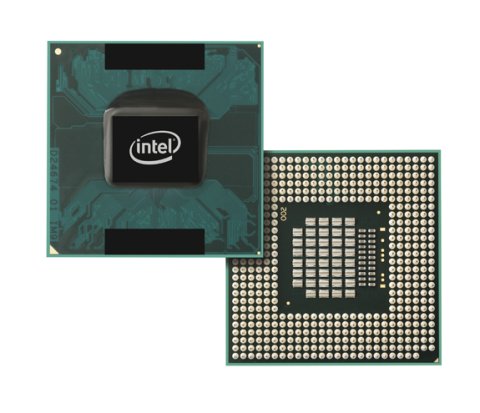
If we said ROM and RAM are the brains of the computer while motherboards are the blood vessels of a computer, then processors are the heart of a computer. Processors are what makes a computer operatable in the first place; without a processor, your CPU won't be called a CPU after all. Take notice: CPU = Central Processing Unit. Notice the word "processing"? Yup, processors are the main characters of CPU after all.

In terms of processors chip, Intel and AMD are the major global players out there; I would be surprised if you tell me that you're using anything other than these two, because they are simply the best there is. Problem is, if there are two different processor chip manufacturers out there, which fabrications are the best? Which are more suitable for user's PC?

If we are to judge from a commerce point of view, Intel surely has been the more dominant one; In the first half of 2008 it is reported that Intel, with its Core 2 line of processors, completely outsold AMD and its Athlon and Turion line of processors. AMD, on the other hand, suffered financial woes and just recently had most of its share sold to an Abu Dhabi company to create a new semiconductor company. It's not a bad move, considering that the gobal financial crisis struck a month or so after that deal. However, with AMD no longer in full control, its troubles are not over yet.

But for now, let's just shuffle the two manufacturers' respective market shares and global revenue aside, and focus on what consumers care most: How does the two stack up together? How do they perform in terms of performance, price and even power consumption?

We'll take the processors, Intel Core 2 and AMD Athlon as comparisons.

Here's a point of view for MOST of the PC users out there:


"Intel has a stranglehold over AMD ever since 2006 when they led the charge by introducing the Core 2 line of processors, which pioneered the concept of pure double processors. However, AMD would of course, not let Intel walk away with it; they introduce competitive pricing strategies and forces Intel to follow its lead in pricing strategies. As Intel are to supply a wide range of Core 2 processors, AMD had its answers ready through its vast range of AMD Athlon x64 X2 model of processor chips. But if we are to talk of performance pioneers and quality products, Intel rules over AMD."

This shows that users generally favor Intel over AMD, but why?

We shall justify the point of view from most users:


So, if Intel Core 2 wants to be the King of Processors, here's some of the AMD Athlon chips they have to beat:

ModelClock speedCoresL2 cache (total)Fab processTDPPrice
Athlon 64 X2 4400+2.3GHz21MB65nm65W$170
Athlon 64 X2 5000+2.6GHz21MB65nm65W$222
Athlon 64 X2 5600+2.8GHz22MB90nm89W$326
Athlon 64 X2 6000+3.0GHz22MB90nm125W$459
Athlon 64 FX-702.6GHz44MB90nm125W x 2$599
Athlon 64 FX-722.8GHz44MB90nm125W x 2$799
Athlon 64 FX-743.0GHz44MB90nm125W x 2$999

If AMD are to become the King of Processors, here's some of the Intel Core 2 chips they have to beat:

ModelClock speedCoresL2 cache (total)Fab processTDPPrice
Core 2 Duo E63001.83GHz22MB65nm65W$183
Core 2 Duo E64002.13GHz22MB65nm65W$224
Core 2 Duo E66002.4GHz24MB65nm65W$316
Core 2 Duo E67002.66GHz24MB65nm65W$530
Core 2 Extreme X68002.93GHz24MB65nm75W$999
Core 2 Quad Q66002.4GHz48MB65nm105W$851
Core 2 Extreme QX67002.66GHz48MB65nm130W$999

So, basically if Intel Core 2 and AMD Athlon are to go head to head, this is what will happen:

ModelPriceModelPrice
Core 2 Duo E6300$183Athlon 64 X2 4400+$170
Core 2 Duo E6400$224Athlon 64 X2 5000+$222
Core 2 Duo E6600$316Athlon 64 X2 5600+$326
Core 2 Duo E6700$530Athlon 64 X2 6000+$459
Core 2 Quad Q6600$851Athlon 64 FX-72$799
Core 2 Extreme QX6700$999Athlon 64 FX-74$999

We can see that quite clearly now: Although Intel has the Core 2 Quad and Core 2 Extreme performance advantage over AMD, AMD has the pricing advantage over Intel processors; the less high-end Intel Core 2 processors compared to, the cheaper. At the price between $ 170 and $ 459, AMD simply pawned Intel's Core 2 Duo processors. However, AMD's processor performance generally start struggling at the peak of Athlon x64 X2 6000+. That was where Intel's processors started standing out. After Core 2 Duo, Intel has some more monsters in the form of Core 2 Quad and Core 2 Extreme. At this point, AMD has to roll out their best Athlon processors, the FX series. However even with the big FX series, AMD had reached its performance limits, while Intel still had some to spare with its Core 2 Extreme 6800, priced similarly to the FX -74 processors of AMD.

Here's a reality catch:

Price are ALWAYS the major considerations for PC buyers. Very few people out there, excluding the gaming geeks, will want to purchase a high-end performing PC with a high price if their motive of using a PC is just to do some office works, play some cards or flash games, surf the web and some occasional media entertainment. From here, it sounds as though AMD has won the battle. However, there are people who perceive low pricing as an implication that AMD is struggling with performances and are keeping their price low to stay with Intel on the battle and therefore, will favor the seemingly better Intel. Again from here, it is obvious that AMD, whose processors are known for low price with standard performances, might not have the upper hand at all....and AMD continue to play this low-price marketing strategy till this day, perhaps, without even realizing what they have done might cost the company its reputation...So once again, Intel has the upper hand.


A normal PC users' most likely point of view is as simple as ABC: Intel not just have the equal if not better performances and quality over AMD, they actually have the technical and moral advantage over AMD. AMD tried to ammend the lack of front-running performances by applying pricing strategies, but while this will work in their favor, it will backfire to a certain degree. Judging from all the perspective i've discussed above, most users will still flock to Intel processors because they are assured of equal quality and performances at an expensive but reasonable price. However, AMD will only gain through some of its cheaper-priced processors. By applying pricing strategies, AMD still failed to prevent its larger and more performance-wise processors from being killed by Intel's because they are not as high-end as Intel's, but their price (see the chart above) are not in any sense, much lower.

In my opinion, AMD should stop using pricing tactics on their product and get on with the development of their processor chips, or else in no time they will lose even more customer's confidence in their processors while falling behind Intel even more in development. Intel simply outperformed them in terms of chip quality and performance; they should worry more about their technical progress instead of their market performances. Intel has already came up with Core i7 (aka Nehalem) in the form of 940, 950 and an even monstrous i7 Extreme 965. What would AMD do?

Core i7 is Intel's latest effort to extend its market dominance over AMD. All i can say is that if AMD fails to impress, then we shall see a processor-monopolying Intel in the future market.
Read more >>

December 29, 2008

Useful IT Practice: Detach your Laptop's Battery when running on External Power Supply


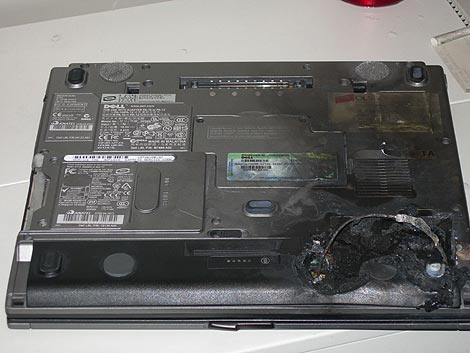
Owners of laptop are somehow facing more risks than owners of desktops. Not only laptops are easier to be stolen, they are delicate. A spill of coffee on the keyboard or a falling-off from your lap onto the floor may spell the end of your laptop. As if these issues are not enough, laptop owners also need to be prepared for situations where the ion-lithium battery cells overheated and explode, causing property damage or even physical injuries. Now that's what i called uncool.

Battery-exploding cases are common...If your laptop's battery gets overheated easily, watch out; you might be next!

Fortunately, there are two habits which laptop owners can rely upon to decrease the chances of their battery cells overheating or exploding. The first habit is to get your laptop working on a low-temperature environment, for example, in an air-conditioned room or running the laptop with a high-voltage USB fan. The second habit, is the practice of detaching your laptop's battery cell from your laptop when you are running your laptop on an external power supply or on cable.

Ion lithium battery cells of laptops are detachable from the main body because like all ion lithium powered products, the cell charge of ion lithium will deplete aka lose charge. When an ion-lithium battery no longer could provide long-standing power supply to a laptop, owners will need to contact their laptop manufacturers for a replacement, either through retailers or via direct contact. In other words, the ion lithium battery cell of your laptop WILL expire one day.

While the common perception of users normally are that we only detach the battery when the battery needs replacement, actually, we can take advantage over the battery's detach-ability. And for good reasons too. By detaching the battery while running on external power supply, not only can we preserve the battery's longetivity, we can actually prevent ourselves from harm due to battery cell explosion!


Here's a simple guide to detaching and reattaching a laptop's battery cell:

1. Make sure that the laptop is currently running on an external power supply. Actually, it is better if your laptop is not power on and running when you detach the battery. If you are currently doing something, either save your work and turn off the laptop, or put the laptop in hibernation mode.

2. Slowly and gently flip your laptop around to face the battery compartment.

3. CAREFULLY detach your battery cell from the laptop. Ways of detaching the laptop battery differs based on the laptop's designs. Make sure you have at least a vague idea of how to do it, or you might end up damaging your laptop.

4. Turn your laptop around, open the lid and resume your work. If it's turned off, just boot it.

5. When you decided to run on battery power supply, turn your laptop around and reattach the battery cell back in place BEFORE you remove the cable, or else you end up losing your work or damaging your laptop!

After you removed your battery from your laptop you should have altogether, a bar of battery cell and your laptop. Anything more than that means you must've removed something extra which might be catastrophic!


Take note that although detaching the battery cells does have unique benefits, there are certain risks too. If you are currently at your home, be sure to watch out of approaching thunderstorms or your local cable workers working on power supplies. Both these issues might trigger a cutout of power supplies and completely wipe out your work on the laptop! In that case, i suggest you remain you laptop's battery intact or just don't use your laptop at all. Personally, i only detach my battery when i'm using external power supplies on public areas, such as at my church or at my university, where i am 100% guaranteed of unaffected power supply under normal circumstances.
Read more >>

December 23, 2008

How to Really Speed Up Computer...


When people buy a computer regardless of it being a desktop or laptop or netbook, what they always had in mind was performance. For example, they want an Intel Core 2 Duo processor, discrete ATI Radeon graphic card and at least 2 GB of RAM as retailers nowadays are promoting mainly Windows Vista. Some people thought that with the above specifications, their computer would fly in speed and performances. However, what they are going to get is a terrible experience. The computer is slow as a snail as though it was running on an Intel Celeron processor!

Intel Core 2 Duo.....

ATI Radeon Graphic Card....

2GB of RAM.....and in the end you keep on saying:

I bought my first ever computer in the form of a Compaq Presario V3000 series laptop just about two years ago during the Christmas season of 2006. Despite its beautiful appearance, the specifications are nothing of the best at that time to say the least: an Intel Core Duo processor running on 1.6 GHz, an Intel Media 950 Graphic Accelerator, 512MB of RAM and an XP operating system. I was a total computering newb at that time and i didn't realize that my specifications are quite poor but after two years into purchasing the computer, i migrated to Vista Business and my laptop is still running smoothly; just as nice as when i was running XP!


I wondered why my computer can run on a Vista platform smoothly, despite the fact that my laptop's specifications are not really the suitable one at running Vista. I thus do a little checking: Vista was not the fastest operating systems out there but by selecting Vista Business with a little tweaking, i managed to make things just as smooth as possible without abandoning the Aeroglass interface. I added my RAM up to 1.5 GB and it is sufficient in running a Vista Business operating system. But other than these two factors, nothing about my pc seems to say it was good at running Vista....the Core Duo processor is quite the minimum requirement for the optimum running of Vista and my Intel graphic cards are worst off, as it is the worst part of my laptop's performances. So why on earth that my laptop is running Vista just as nice as some of the better laptops out there???

So the last consideration was hard drive. And I was right to suspect it.


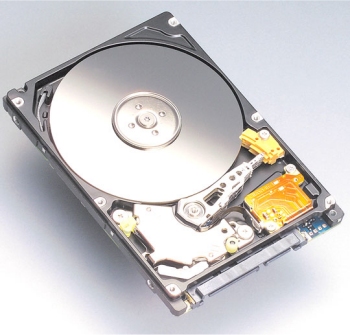
Do not misinterpret my meanings. Processors and graphic cards are important, but by far they are not the most important considerations. The slowest part of the PC is by far, the hard drive disk (HDD). A computer is as fast as the slowest component inside, and therefore my opinion in purchasing a computer is to invest in a better hard drive disk rather than paying attention on just stuffs like processors and graphic cards. Contemporary processors such as Intel Core 2 Duo and AMD Athlon FX series run at 30 times the speed of hard drive disk, while graphic cards often have multi-processor core. but HDD....well, this fellow is always the slowest part. This explained the reason why my laptop can still run Vista very smoothly if not as fast as lightning, and explained the reason why some people with overall specifications better than mine are problematic at running Vista in the long run. One of the major reason is because i owned a better hard drive disk than them who owned a better processor and graphic card!

Misleading PC vendors often advice buyers to invest in better processors and try to convince us that a faster CPU processor with third data level caching are going to make miracles in your computer's speed. Well, that ain't the whole real picture, isn't it? That is all good with a fast processor but with a slow hard drive disk, it wouldn't make much difference. Most part of your CPU would be "taking a vacation" anyway if it does not get higher data rate from the hard disk to process; it was like having a McLaren F1 on a congested highway, where it could not go any faster even than a loaded garbage truck!

So the next time if you want to significantly speed up your computering experience through hardware modifications, my advice is to have your money invested in a better hard drive disk. For example, go get a solid-state drive (SSD) installed on your computer instead of a Quad Core or a Core 2 Extreme processor. Do however, take note that installing any new components on a pre-existing computer sold at the retail shop also requires user to be aware of meeting the basic hardware requirements. This is also a major reason why PC users usually would never consider investing in hard drive disk because it simply does not make life easier compared to upgrading RAMs or processors.


Provided you have the cash to do the job, before you start thinking of investing in this, think about investing in this:


Have a nice and productive day!!!
Read more >>

December 10, 2008

Choosing a Computer: Dekstop or Laptop?


There are many things to consider while buying a computer. You consider the brand that you would like to purchase. You also consider the type and capabilities of the processor, the type of graphic cards, the type of audio system drivers. If you are an expert computer user in demand of a high-end PC, you might think about other considerations such as the complications of detaching the CPU cover (if you are into modifying hardware), the type of motherboards and even the type of CPU fan (some even proceed to apply water-cooling for their desktop CPU).

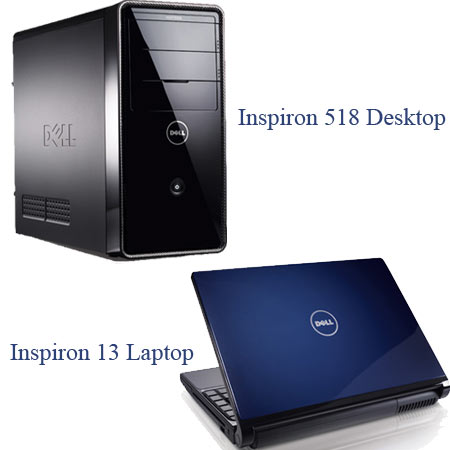
However, before you start off with all these considerations, do you have your mind set on what types of PC you would like? Have you considered whether it's a desktop you want or a laptop that you want? Some people do not know the functional difference between a laptop and a desktop; which is the reason why they made a computer purchase and lamented on their mistakes later when they found out that it does not match with their lifestyle and usage habits.


Desktop or Laptop???? Desktop or Laptop???? You decide, you pay the price!!!

Choosing to buy a laptop or a desktop PC is even more important than any other considerations such as your motherboard or the amount of RAM you would like. The reason for this is because while considerations for adding RAM or changing your graphic device can be done after you purchase a PC, considerations on the types of PC are permanent after a purchase; you can add RAM after you buy a PC, but you cannot change your desktop into a laptop after a purchase and likewise is from a laptop to a desktop-not until your PC is damaged beyond repair and you need a new one LOL!!!

First, we'll take a look at the definitive explaination of a desktop and a laptop:

Desktop:

1. A desktop has most of its components in a case, with the exception of the keyboard, the mouse, the monitor and the audio speakers.

2. Desktop casings usually are in the form of tower casings or horizontal casings.


Laptop:

1. A laptop is a totally self-contained, lightweight and portable unit.

2. Laptops are run through both ion-lithium battery cells and external power source.


To decide on which types of computer are more suitable for you, here's some important considerations to understand and analyze:

1. How do you plan to use your computer?


Are you buying this computer for job purpose? Or are you buying it for entertainment and gaming purpose? Do you need to travel around with a PC a lot? How long are you going to use the computer? Do you use your computer for sharing purpose?

Example of what you can do with a desktop if you use your computer for gaming purpose....:)

2. The respective advantages and disadvantages of a desktop and a laptop.

- Desktops cost less of your wallet. They normally use standardize parts, which make it easier for users to "clon" their PCs with different hardware parts. Most importantly, desktop are easier to repair.

- However, desktops claim lots of physical space, are difficult to transport and they require an external power source in order to work.

- Laptops are portable and they are self-contained so they do not require as much physical space as compared to desktops.

- However, they are more expensive, are easier to steal and most importantly, they are more prone to damage and it is not easy to repair or modify it as their hardwares are smaller and less standardized.

Laptop-stealing are no fresh case in the world. Let's face it: sometimes being more portable also means asking for more trouble...:\


Confused? No matter! Here are five basic tips on how to choose the types of PC:

Tip 1: If you are an employee or student with high mobility and in constant need of access to the internet or your data, choosing a laptop is the best for you.

Tip 2: If you are a home user who only uses the PC for gaming purpose, the best choice is to go for a desktop which observes hardware standardization.

Tip 3: If you want to share a PC with friends in your company or college, laptops which have better mobility are the better choice.

Tip 4: If you are buying a computer with the intention of experimenting both on software and hardware matters, then choosing a desktop which is easier to repair or modify is better.

Tip 5: If you decide to make a one-time computer purchase and are not going to modify or upgrade it for a long time as long as it works the way you want , then going for a desktop which will likely fail less is better.

Whatever intention it is, it isn't easy in making a substantial purchase such as a computer...Therefore, it is always important that you've made up your minds early before the purchase, or you might make rash decisions!
Read more >>

Review Digital Plexus

I do not know how well this blog is doing unless there are feedbacks. Please do leave a review or two with us on how you think about Digital Plexus, its authors or the qualities of the posts. Good and bad comments are all welcomed, but please avoid posting rude/obscene comments that are not helpful to any of us working on this blog:

Disclaimer:

This blog is dedicated for the benefits of those who seeks experiences, knowledge or information in the computer, IT news, technology and software & hardware area. Digital Plexus cannot control how readers use the information, including any fraudulent conducts, illegal activities or deeds as regard by the law. Therefore, Digital Plexus & its authors shall not be liable to any damages caused by readers who misuse the information provided.

Digital Plexus utilizes information from many sources, including personal experiences of authors. Digital Plexus will never claim credits or ownership rights regarding the information it used in the blog, except for the raw articles posted on the blog - those are original materials written by the authors of Digital Plexus itself after the compilation of various information and/or experiences.

Followers

  © Blogger templates 'Neuronic' by Ourblogtemplates.com 2008

Back to TOP