Announcements:

I am currently writing at Computelogy.com actively and that's why i sort of abandoned my own tech blog. Since i am too busy to be taking care of both sides, i guess this blog will go into hibernation for a very very long time. Regrettable, but then it's hard to come up with new posts & stuffs.

So once again, i am now writing actively at Computelogy. Feel free to visit there and enjoy our latest articles and posts!

Showing posts with label Windows. Show all posts

June 17, 2010

Understanding PC: Will Increasing PC Speed By Increasing FileSystem Cache Pay Off?

I recently helped a friend clear up his PC problem when he reported lags and glitchy performance with his Windows XP. A brief questioning of the situation revealed that he had done a filesystem cache tweak which leads to his PC performance degrading.

There is a common belief that by increasing the FileSystem Cache of Windows, users can experience a boost in PC performance, since Windows will tend to use the maximum available RAM to power applications, resulting in more responsive scenarios. In fact, I am going to show you how to do it here:

1. Click Start, type in “cmd” and you will see the command prompt icon.
2. Right Click the cmd icon and choose “Run as Administrator
3. Now in the command prompt windows type in the following command.
fsutil behavior set memoryusage 2
4. Now restart windows 7.

If you want to review your actions, using the following query in cmd will show you the value.
fsutil behavior query memoryusage

There are many websites that claim that any users can perform this command to increase PC performance. Do not believe this, for some of them did not properly explain the logic behind FileSystem Cache or conduct a benchmarking...which is misleading, i must say. If unsuspecting users do this on a PC without the proper requirements, it will not have any effects and if worse, will result in an even worse performance than before!

By nature, increasing FileSystem Cache size means that your PC will attempt to maximize RAM usage, usually with a benchmark for example, it will prevent RAM usage from falling below single digit level and make applications run at the maximum possible performance. Your PC can also handle more concurrent operations, since the page pool limits are being raised. This tweak is popular with servers, since they are the ones that have to handle multiple file operations.

With the logic above in mind, we can conclude that:

1. Increasing FileSystem Cache size is best performed on a PC with large amount of RAM onboard, with a mimimum of 2GB on Windows XP & Windows 7 and an additional 0.5 GB on Windows Vista. Most importantly, a majority of these RAM must be free from application use, otherwise applying the tweak will result in negative effect.

2. The success of FileSystem Cache tweak is heavily influenced by memory amount, therefore 64-bit OS can take advantage of this tweak rather than 32-bit OS. The reason is that the maximum RAM that can be used by 32-bit OS is 3.5 GB, while 64-bit OS can use 4GB-8GB and beyond.

3. Since this tweak is originally for servers that operates at something like 8GB & beyond, i highly doubt that a normal PC system below 8GB RAM could actually see a difference by applying the tweak.


I know i will need someone's in-depth research and benchmark to support my conclusions, so i dig around and found this excellent analysis by Eric aka TweakHound.

In his research, you will notice that the conclusions i've made regarding the FileSystem Cache tweaks are proven. With benchmarking, research & consultation from expert, Eric concluded at the end of the test, that on normal PC, the tweak is USELESS.


My final advice to majority of users out there is, don't waste your time applying this tweak. As I stated before, this tweak works best with 64-bit OS that runs on high amounts of RAM and also the hardware befitting those of server computers, but trust me, even if your computer fit these requirements, the performance improvement is not enough to produce a positive impact.
Read more >>

April 16, 2010

Conduct Simple 1-Click Windows Troubleshooting and Repair With Microsoft Fix It Center

There are two things that would normally frustrate Windows users: a malware-infected computer and a computer which have lots of rogue and broken files and settings that interfere with normal PC usage. In my experience, the latter actually often result in people reformatting their PC more than the former...and let's admit it, majority of people are un-geeky in the computer maintenance arena who don't even know how to defragment their PC...(thankfully Microsoft lets Windows Defragment run on a schedule without user interference since Vista!)


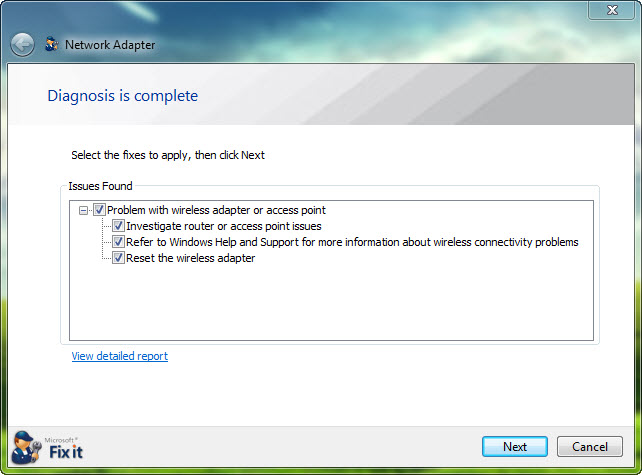
Microsoft has come up with a free utility software aiming to help those less tech-savvy users in troubleshooting and repair their Windows; this software is called Microsoft FixIt Center. It is currently in beta stage, but it is quite stable to use. It installs fast, requires minimal user attention and does not hog up many CPU resources or RAM to run.


What this lightweight little program does is troubleshoot your PC's common area where errors are known to occur and apply tweaks and suggestions for you to repair and solve the issue. It is design to be plain simple and friendly, with a complete list of troubleshooting area ranging from networks and internet connection to media players and power settings. 


With Fix It Center, I also believe Microsoft aims to create a full-featured database where they could collect, investigate and share troubleshooting tips and tweaks for multiple users. Which is why they also include the option for users to create an account with Microsoft Fix It Center where users can receive additional help and support.  


In fact, i think this utility will be just the next successful tool from Microsoft for the average users. I'm already planning to install this utility on one of my PCs for the long term, as well as installing it on other users' PC where they proved too average to troubleshoot and repair Windows settings. 


Microsoft Fix It Center Beta works with Windows XP (with Service Pack 3 installed only), Vista and 7.


Visit Microsoft Fix It Center Portal to download the utility tool for your PC.
Read more >>

March 17, 2010

ICare Data Recovery Special Edition For Free Till 25-03-2010

This is the first time I heard that there is a data recovery software named ICare Data Recovery. Today, first time I heard about it. I have no idea how it works and what algorithm it uses. So, can not have any opinion. 

What I will do is just copy what they said on their website.

The last date of ICare Data Recovery SE is March 25, 2010. If you need it, you should get it before the time ends. This might not be the latest version.

iCare Data Recovery Software is dedicated in most frequently data loss like formatted hard drive, MBR (Mast Boot Record) corrupted, bad boot sector, drive inaccessible, partition unreadable, partition deleted, software operation failure like Partition Magic caused data loss, Ghost failure, virus attacked, etc.
Supported Storage: hard disk drive, memory card, USB drive, pen drive, external hard drive etc.
  • Never lose photos and files again
    This data recovery software is an award-winning Windows recovery software, works when other utilities have failed.
  • Rescues lost/delete photos and files
    iCare recovery software helps you to recover digital photo, audio and video files even when they are lost, deleted or the memory card, removable media is formatted.
  • Support recover files
    IDE / ATA / SATA / SCSI hard disk drives, SD Cards, CF Cards, XD Cards, Memory Sticks, external Zip drives, FireWire and USB hard drives.
  • Support RAW files
    This software has highly advanced algorithms ever designed to support file recovery from RAW file system when your drive is read 0 byte while you have tons of files in it or usually known as RAW drive.
  • Very Easy to use
    With ICare Data Recovery Special Edition, you can recover your photo, RAW photos, music, video and audio files with only a few clicks.
  • Designed to work with Windows 2000, XP and Vista.
Get Free:
Open the following web address into your browser and download ICare Data Recovery Special Edition.

Use the following license code to register the program. There are not spaces or hashes in the code.
2K1XB2X964MPHOCJ8M1RYIJF0OVHFOFH

You can read tutorial here:

Home page is here:

Read more >>

March 3, 2010

AnyBizSoft PDF to Word Converter 2.5.3 (Save $30)

I was avoiding to write about getting free AnyBizSoft PDF to Word Converter 2.5.3 because it has already been shared on many web sites. The most popular site is Softpedia.com where it was announced first. The reason to share is I received message from Daniel through contact form and he asked me to share this news so that someone, who did not know already, can get it free. Thank you Daniel for motivating me.

In fact this is not a latest version. But it is still a good choice if you do not have any PDF to Word converter. I have not tested it. They say:

User-friendly interface, easy to use:
· One operating interface
· All the settings can be done in the operating window

Supported formats:
· Support importing Adobe PDF 1.0 - 1.7 formats (.pdf)
· Support exporting MS Word 2003 and 2007 formats (.doc, .docx)
· Support converting encrypted PDF to Word documents and password-protected PDF files

Importing PDF files:
· Support importing multiple files as many as 10 PDF files
· Support dragging and dropping PDF files into the program

Conversion:
· Batch conversion - PDF to Word Converter can convert multiple PDF files to Word documents in a task
· Partial conversion - Users can select any pages from the PDF file to convert
· Shortcut conversion - Right-click on a PDF file and convert it into a Word document without launching the program.
· Management of the imported files - Users can freely decide the priority of the imported PDF files for conversion and remove the wrong imported ones.
· Fast conversion - The converting process is very fast. There is a process bar indicating the processing of every single file conversion.

Good preservation:
· PDF to Word Converter can preserve the original layout of text, columns, tables, graphics and even hyperlinks of PDF files to Word documents. There's no need to retype or reformat the converted documents.

Viewing files:
· Imported PDF files can be viewed with the pre-installed PDF reader before conversion.
· Users can choose to view the converted files or open the destination folders after conversion.

Get Free:

Open the following web-page into your browser and fill a short form asking your name and email and press Big Orange Button Send Me Keycode.

http://www.anypdftools.com/pdf-to-word-get-keycode.html
(web address copy n paste)


Check your eMail inbox. You will have an eMail from AnyBizSoft in less than 2 seconds. You will receive Keycode, User name and download link into your eMail. User name is in fact your registered eMail address. Use these info to register your copy of AnyBizSoft PDF to Word Converter.


You can also find download link on the form page and I am giving it below, too:

http://download.anypdftools.com/anybizsoft-pdf-to-word_free.exe
(link copy n paste)

Main promo page is here:

http://www.anypdftools.com/pdf-to-word.html
(web address copy n paste)

Enjoy it.
Read more >>

February 27, 2010

Tizer Rootkit Razor, Another Great Antirootkit Free For Personal Use

I've come across few independant antirootkits in the market nowadays; most antirootkit module are incorporated into so-called internet security. For example, the antirootkit module of famous antirootkit GMER, is actually integrated into Avast!. Even though there are some free antirootkit such as Panda Antirootkit, Sophos Antirootkit and Blacklight from F-Secure, few of them are full-featured and compatible with all versions of Windows.  The only antirootkit that works substantially is UnHackMe, also a freeware (with paid upgrades available) despite it slowing the boot process significantly.

Tizer Rootkit Razor is not necessarily a new kid on the block, but since the company is quite low-profile, very few users really do know this antirootkit. Nevertheless, the company has one of the more impressive independent antirootkit i ever came across. Here are some of the goods about this antirootkit:


1. Rootkit Razor's GUI is dead simple


The antirootkit's layouts are simple to navigate and are all functional; People who asks for simplicity and nothing too fanciful about GUI design will be attracted to this program; Well, it's supposed to be designed to do what it does anyway: find and terminate rootkits!


2. Rootkit Razor is feature-packed


Most antirootkit only revolves around the basics: processes, registry and services. Not for Rootkit Razor, though. This little baby has all sorts of scanning features: processes, registry, kernel modules, services, files and folders, network ports...pretty complete set that i've seen. Even though the website doesn't state this benefit, Rootkit Razor actually does not require a services process to run, and therefore, can be executed in Windows Safe Mode, where services process are usually prevented from running.


3. Rootkit Razor is highly compatible with modern OS


The previous chart image should explain everything: Rootkit Razor integrates seamlessly with contemporary versions of Windows spanning from XP to 7: and it really does; i've installed Rootkit Razor on all versions of OS; none of them had any installation errors or running errors. Uninstallation of Rootkit Razor also works fine, though there are some registry leftovers that will require the aid of registry tools to clean it up.


4. Rootkit Razor is moderately lightweight


Okay, so antirootkits are supposed to be easy on PC resources, since they are just simpler programs designed to do specific tasks (eliminating rootkits). Rootkit Razor are not exactly light on resources when active, but when idle, they are pretty easy on resources. Maximum CPU cycles used on smart scan hits 45 out of 100 and memory of up to 5000K is utilized. On idle, CPU drops down to 0 CPU cycles, though the memory sometimes stays at 5000K or even higher or lower after a scan.


There are also some bads as well:


1. No Real Time Protection or Boot-time Scan?


Perhaps i've been biased, but after using UnHackMe Antirootkit, it has become a must of mine that good antirootkits are supposed to have real-time bootwatch modules, or at least a scheduled boot-time scan. Rootkit Razor can only be functional when Windows is fully logon into desktop mode.


2. No User Interface for Novices?


Not all PC users are computer-savvy, so why no summarized interface, like what F-Secure did with Blacklight (the one-click module)? I love how Rootkit Razor presents all its features which suits an advanced PC user like me, but i'll bet that begginers will be turned off by the advanced knowledge of PC required to work with Rootkit Razor - if any beginners took interest in this antirootkit in the first place. The image above says it all: manually searching for rootkits in the registry? That's not going to attract much novice...


3. Not supporting x64 bit OS?


I do not have this tool tested on x64 bit OS, but from general feedbacks and comments i could get around the web, Rootkit Razor does NOT support x64 bit operating system. Soon and very soon, 32-bit OS will extinct with the launch of Windows 8 and 64-bit and 128-bit OS will be the mainstream architecture of modern OS. Are the developers aware of this upcoming trend or not? 


Still, Rootkit Razor is a decent antirootkit that you can keep with your 32-bit PC and periodically executes it to scan for rootkits. If you are an advanced user who are IT-knowledgeable and have experience working with the likes of advanced-level antirootkits such as GMER and TrendMicro HijackThis, then Rootkit Razor's the tool for you.


Download Tizer Rootkit Razor here.


Visit Tizer Rootkit Razor's Main Page here.


Read more >>

February 19, 2010

Easily Backup Your PC With COMODO Time Machine


Windows only:


COMODO is always known more of its Firewall than of anything else, but that apparently doesn't stop them from developing other security tools, notably the Internet Security, Antispam and System Cleaner. However, more recently COMODO began looking at the backup and system restore department. Which leads them to create Time Machine, a system restore aka system rollback utility which acts as a powerful replacement for Microsoft's inbuilt System Restore function.


As its name implies, COMODO Time Machine deals with restoring a PC to a previous state. However, unlike the System Restore of Windows, Time Machine gives users personal control over what and when a system is to be backup and restore. It works by creating snapshots of the entire system and allows you to switch between these snapshots with a simple reboot of the computer. It also comes with the ability to take snapshots based on scheduled time. Most interestingly however, Time Machine allows snapshots to be mounted in different partitions. This incredible feature allows user to recover files without having to reset the entire system.


Time Machine is protected locally with a Username-Password access routine, meaning that users will not be able to access COMODO Time Machine and its settings unless they know the username and password.


As snapshots accumulates and eventually stuffs up disk space, users can always reset the 'baseline', meaning that Time Machine will take the current snapshot of the PC, delete all the other existing snapshot, and boot into the new base snapshot.


Below are a detailed list of the features of Time Machine:
  • Easy to use - even beginners can quickly create system snapshots with a few mouse clicks
  • Provides instant and comprehensive system recovery after virus or spyware infections
  • Instantly reclaim your machine after devastating system crashes
  • Rollback the changes to ALL your documents - not just changes to system files and the registry
  • Boot-up console allows you to rollback even when your system will not boot to Windows
  • Test new software and network configurations in the knowledge that you can quickly switch back if problems develop
  • Completely remove unwanted software installations without the need to uninstall or clean the registry
  • Flexible restore options allow you to mount and browse snapshots to recover individual files or folders
  • Right click on any file or folder to synchronize it with a snapshot version
  • Schedule regular system snapshots to ensure highly relevant restore points
  • Network administrators have another way to quickly fix user or software problems
  • Libraries, Internet cafes and other publicly shared networks can schedule a total system restore at the end of each session
COMODO Time Machine is freeware, so users can use if for free on any PC, if they decide to replace System Restore completely. In fact, i think it actually outperforms the built-in System Restore completely.

Time Machine works with Windows 7, Vista, XP and Windows Server 2003 & 2008. Both 32-bit and 64-bit Windows are supported.
Read more >>

February 13, 2010

Get FREE 3-Month License Key for Avira Premium Security Suite


 Been busying preparing for Chinese New Year, but then this is an offer i could not resist skipping through here. You see, under a few hours ago, Avira made another promotional offer, this time users can get a free valid three-months worth of Avira Premium Security Suite's license key. Avira Premium Security Suite is the best protection Avira could offer to users, so best to take your chances now!

And trust me, there are relatively few offers from antivirus vendors nowadays, and Avira is as kind as to offer us one! (Be reminded that Avira is a pretty decent antivirus!).


To get the free 3-month license key:


1. Visit the Avira Online License Page, where the promotion is held.


2. Fill out the online form. The information can be anything but the e-mail must be valid.


3. Press the 'Request Your License Key' button after you complete the form.


4. Avira will send a 3-month license key to your mail (remember to check your junk inbox).


5. Download Avira Premium Security Suite, install and apply the license key.


That's it! You are now protected by Avira Premium Security Suite for 3 months!


I do not know whether the license key can be applied on the new beta version of Avira or not (refer to my 'beta tests' page for information). If anyone has tried it out and working, please do inform us here. It will be much appreciated!
Read more >>

February 8, 2010

Get Free EASEUS Partition Master Professional v5.0.1 Till 20-02-2010 (Save $40)

Hi Friends, aviator365 has shared a great promotional info to Get Free EASEUS Partition Master Professional v5.0.1. This promotion will end on 20 Feb, 2010. Now again you have the chance to save $40. No need to be hurry but if you really want it, you should get it before the last date. Better to do now instead on last hour.

They say:

The most common partition problem for computer users is that the system partition runs out of space, the system partition needs to be expanded. But for most users, changing partition structure requires operating system reinstallation and format. The built-in partition manager function of EASEUS Partition Master is right to meet the need. It can expand the system partition without Windows reinstallation and data loss. Increasing volumes of information requires companies to make better use of their hard drive capacity, so the need to reasonably resize, move, split, merge the partitions is more important than ever. Any operations with hard drives are critical, and reliability of performance is one of the most important requirements when choosing partitioning software. EASEUS Partition Master is not only reliable itself but also integrated with the Disk & Partition Copy Wizard and Partition Recovery Wizard to ensure 100% data security.

  • Extend System Partition to optimize the computers' performance.
  • Resize/Move Partition without data loss to solve low disk problem and optimize the usage of disk with the drag-and-drop operations easily.
  • Create Partition for different usage. For example, one for your data and another for the system. (We advise you to create at least two partitions to easily handle the data and system separately.)
  • Merge Partitions into a bigger one when one of them runs out of space.
  • Split Partition for different usage, one for system and another for data.
  • Delete partitions with simple steps.
  • Wipe Partition can erase the data on the partition completely and ensure that the data can not be recovered by any data recovery solution.
  • Delete all partitions and Format partitions with simple steps.
  • Create a Bootable CD/DVD to manage partitions even when the computers fail to boot. (Except for Home edition).
  • Support Hardware RAID - useful feature especially for the Windows Server users.
  • Convert FAT to NTFS.
  • Explore FAT/NTFS partition.
  • Label Partitions - assign drive letter to partition for easier recognition.
  • View Disk/Partition Property.
  • Hide and Unhide Partitions - protect important data from unauthorized or casual access.
  • Set an Active Partition - specify one partition to be the boot partition.
  • Provide option to shut down the computer after applying any operation.
  • Powerful safety features protect you against system failures while partitioning.
  • Step-by-step wizard walks you through partitioning process.
  • Preview any partitioning tasks before apply to the hard disk.
  • Change cluster size automatically and manually.
  • Undo feature allows you to undo any partition step.
  • Support hard disks from 2 GB to 2 TB.
  • Support up to 32 disks.
  • User-friendly interface.
 Get Free:

Open the following web page into your browser and click on green button Free Download in the middle of the page.

http://partition-tool.com/giveaways/epmpro/
(web address copy n paste)

You will be directed to a Major Geeks website to download EASEUS Partition Master Pro v5.0.1. If Major Geeks page is not open, you can access it here:

http://www.majorgeeks.com/Giveaway_-_EASEUS_Partition_Master_Professional_Edition_d6355.html
(web address copy n paste)

Download EASEUS Partition Master Pro v5.0.1 and install it. There is no need to any registration. It is full installation. This means you can save the installer if you need to install it later.
Read more >>

February 5, 2010

Get Free Paragon Disk Wiper 10 SE Till 19 February 2010

Sorry Friends, I am many hours late to post it here. I could do it earlier but for some urgent tasks, I have to go out and just now I came back.
One more Paragon promotion ! If they continue giving away their software, what they will sell? Not my problem, of course, they are gaining customers that's why they have these many promotions. Last week they were giving away Paragon Backup & Recovery 10 Compact Edt. Now they are offering Paragon Disk Wiper 10 SE to ComputerActive readers but any body can access it because of weblink to promo and to registration form.

As the name shows, Disk Wiper is a wiping utility to erase data securely to completely eliminate the traces of erased data making it irrecoverable. What else is offered:

Key Features
q       Graphical representation of the data to gain a better understanding.
q       A handy launcher to easily find and run the required tasks.
q       Comprehensive wizards to simplify even the most complex operations.
q       A context sensitive hint system for all functions of the program.
q       Previewing the resulting layout of hard disks before actually executing operations (so-called virtual operations).
Key Features
q       Basic functions for initializing, partitioning and formatting hard disks (create, format, delete). Instead of the standard Windows disk tools, the program supports all popular file systems.
q       Mount a partition (assign a drive letter) of any file system type to make it available for your operating system.
Key Features
q       Data wiping to successfully destroy all on-disk information including the standard bootstrap code and other system service structures.
q       Free space clearing to destroy any remnants of deleted files/directories left on disk without affecting the used data.


It is strange that the installer is huge and installation also took around 95 MB.

Get Free:

1: Open the following web page into your browser and download the installer which is almost 218 MB. Huge? One single installer for x86 and x64 installation.

www.computeractive.co.uk/wiper/index
(web address copy n paste)

2: Open the following web page into your browser and fill a simple English form asking you your Name, eMail (real to receive license) and country and submit the filled form. You may or may not subscribe for new letter.

www.snipca.com/x815

OR

http://www.paragon-software.com/registration/dw10pers.html

3: Check your eMail. You will have an email from eservice@paragon-software.com within no time. This eMail contains your Product Key and Serial Number which you will use during installation to register your Paragon Disk Wiper 10 SE.

Installation:

During installation, when you will see a window like snap P1, click on the link mentioned as 1. You will get two installation options where 2 is for x86 (32-bit) and 3 is for x64 (64-bit) installation. Choose according to your operating system.


Enjoy It.
Read more >>

January 31, 2010

Change the Color of your Windows Vista/7 Navigation Button with Vista-7 Nav Button Colorizor

Users of Windows Vista and 7 will know this, that the navigation button available in Windows Explorer are predominantly or shall i say, all are in blue color. And believe it or not, some people may have a problem with blue. But then changing the color of the navigation button is no novice's task. Users will have to dig deep into the Windows settings and edit some system files. In other words, it is risky, troublesome and time-wasting. 

Thanks to a genius called vasanrulez lurking around at DeviantART, we now have a tool called Vista-7 Nav Button Colorizer freely available to us all. This little tool simplifies the effort of having to edit system files by providing a friendly GUI for users to adjust the color of their Windows' navigation button. It works on 32-bit version of Vista and 7 only, but then 64-bit support are soon to come.


There are some common drawbacks you can expect from a new tool such as this. Firstly, Vasanrulez has warned us that some antivirus may took the tool as a malware which obviously is just a false positive. Also, you can expect some bugs and stuffs, though fixes and additional features will be coming our way.


For now, it might not be an attractive tool to download yet, but i reckon when vasanrulez iron out most of the bugs aside from adding supports and features, Vista-7 Nav Button Colorizer will soon hit big time. Interested users may want to follow the development at vasanrulez's DeviartART site where he host the tool.


Visit Vista-7 Nav Button Colorizer at DeviantART.com.
Read more >>

January 27, 2010

Enhance Windows's 7 Features For Free with Preme

We'll never get bored of custom enhancement if it provides some measures of usefulness aside from bringing beauties to your desktop. Windows 7 is an awesome OS with many decent features and eye-candies but then enough is just isn't enough. There are lots of tools that are developed to enhance the usability of Windows 7, but none had been quite as impressive as this:


Preme is a new freeware tool which enhances some of the existing features in Windows 7, adding extra hotkeys and functions. Some of the features of Preme are as described below:


  • Touch the upper left corner of your desktop to see all your open Windows either in Flip 3D or Alt-Tab style
  • Hold mouse button on the title bar area of window to keep your window on top of other windows
  • Move mouse cursor to title bar area and scroll down mouse wheel to minimize the particular window
  • Hover mouse cursor on the title bar are and then click the wheel to close the window
  • Right-click on the taskbar button and the mouse cursor will point to Close window option
  • Press ESC button twice to close the active item
  • Move cursor to Start button area to open Start menu automatically
According to the official site, Preme does not require installation; all users need to do is to copy its files to the startup folder in order to load it, or delete its startup entry to remove it. It is also lightweight, utilizing about 2 MB RAM at maximum. Other than enhancing your PC, Preme does not modify Windows 7's original looks and feel, so it is a pretty safe tool to use.

Preme is still under development and thus, there will be bug fixes and more enhancements added in the future. For now, if you want to try out Preme, go ahead and download it at the official site.

*Note: If you like the software then please do give feedback, encouragement and/or donation to its developer. The developer work quite hard on this little tool!
Read more >>

January 26, 2010

Microsoft Releases Silverlight 4 Beta Client For Facebook


For the first time ever...to both Windows and MacOS fans~


Remember Fishbowl for Facebook? Well, for those who didn't, it was a Facebook desktop client released by Microsoft during their annual PDC back in late 2009. Fishbowl is developed by UXLabs@Microsoft and is entirely powered by Microsoft Silverlight, providing an incredible browsing experience of the popular social networking site. Question is, Fishbowl is slightly slow and can be a bit hard to get used to.


Worry not, for Microsoft came up with another alternative - a better one! Microsoft released a Silverlight 4 Beta Client just for Facebook as of now. Like Fishbowl, it runs Facebook using a desktop application instead of the browser, but compared to Fishbowl, it is much faster and more complete in features! This new desktop client for Facebook spots a dark and sleek interface, starting off with the Home screen right down to the Photo-browsing page. Even the photo uploader is pretty neat and workable compared to Fishbowl.


I would ditch Fishbowl any day for such an improvement, but there are setbacks too. If there's anything...anything that this desktop client lack in features, it doesn't have the chat function which is available in the browser-based Facebook. Besides, since Silverlight 4 will required reinstallation once it is out of beta, so it may be a troublesome thing that novice users will have to worry about in the future.


Some additional screenshots for your viewing pleasure:


For those interested to use Facebook poweredby the latest Silverlight 4 Beta, you can get them from this website.


Read more >>

January 21, 2010

Recent Beta Program Updates

I have been busy learning new stuffs in and out during my holidays, so i couldn't fulfill my promise as stated in my announcement area. Nevertheless, i felt it's time i pull myself away from all this learning and started posting something here.


Today i'll not be introducing software or promotions to you, but i'll instead, give you a brief update on some of the interesting beta programs i keep tabs on throughout my holiday periods:

1. Avast! Antivirus v5


This popular antivirus has just came out of beta on the 20th of January. The new v5 has a revamped interface design, more user-centric charts and options plus several new features and scan engine updates. It is incredibly light on PC resources as well. Not bad for a free antivirus, i must say!


2. Trend Titanium


Remember my previous post about Trend Micro Security Beta? Well, this is essentially a renamed version of the previous Trend Micro Security Beta program. Trend Titanium is released as renamed, recolored and optimized feature. Having said that, it still keeps its virtue of operating from the cloud, so it is extremely light on resources. The beta program is still going on at Trend Micro Beta Portal and will proceed all the way into March 2010.

3. Mozilla Firefox 3.6 Release Candidate (RC)

Firefox is pretty much the trendsetter in terms of add-on features and security standards for browsers, but in v3.6, due to release in the coming weeks, Firefox developers are more focused on performance and speed improvements. Personal testing revealed that v3.6 is indeed, more responsive and produces minimal crashes for a beta program, but then it's speed significantly trails behind those of Google Chromes and the latest Opera v10.5.


4. Adobe Flash Player 10.1 Beta


Although the current Adobe Flash Player 10 works just fine with no reported vulnerabilities, the fact is that it is still slow...incredibly slow on graphic rendering. Imagine Youtube's hi-def videos going sluggish on your PC, or the Flash games on Facebook maxing out your CPU cycle, making your PC as slow as a snail! The latest beta version of Adobe Flash Player 10.1 bring GPU acceleration technology to your PC, or in other words, Adobe Flash Player now utilizes your PC's graphic cards in order to render high-definition flash videos and games, therefore reduce CPU stress! Bad news is, there are only some processors in the market that supports this new tech...


5. BitComet 2010 Beta


 BitComet's high times are over; people nowadays would rather recommend uTorrent or Vuze to manage downloads, but then to hardcore fans, BitComet serves them just fine. The new BitComet emphasizes on GUI improvements and  bug fixes, plus some minor network tweaks to improve overall experience.


Read more >>

January 17, 2010

ASCOMP Backup Maker v6.001 [New Release], Synchredible v2.4 [Update], Secure Eraser v3.1 [Update] Free For Private Use

ASCOMP Software GmbH has a new release of  their main software product Backup Maker from v5.5 to v6.001 and this new release is also free for home users (Private Use) like the previous one. If you remember, In September 2009, I have already shared that ASCOMP Software GmbH is offering BackUp Maker v5.5, Synchredible v2.3, Secure Eraser v3.0 free for home users. They have also updated their other two main software: Synchredible v2.4 and Secure Eraser v3.1. These two software are also free for home users (Private use).

There is no difference between Standard Editions and Professional Editions except you are not allowed to use Standard Edition commercially. For commercial use, you need to buy same saftware.


You may be confused when visiting ASCOMP web site because of the contradiction in statements that at order page private users have to pay but at download page these software are shown as freeware. When you will install, you will see in main window Freeware for Private use. So, what is the difference between Private Use, Home Use and Personal Use? Whatever, these software are free for all these three uses.

Because of shortage of time, I was not able to review these software at all. So, if you would like, you can share your views.

Oh, I forgot to tell you once again that I might not be able to write articles as frequently as I have written in past era. You have noticed that I am already writing with delays. I am becoming more and more busy. I hope you will bear this delay with me.

Get Free:

Backup Maker v6.001:
Info:
http://www.ascomp.de/index.php?php=prog&page=desc&prog=backupmaker
Comparision: Standard and Professional Editions
http://www.ascomp.de/index.php?php=prog&page=func&prog=backupmaker
Download:
http://www.ascomp.de/index.php?php=prog&page=download&prog=backupmaker
Direct Download:
http://www.ascomp.net/backupmaker/bkmaker.exe
Operating Systems: 2000/XP/2003/Vista/2008/Win7

Synchredible v2.4:

Info:
http://www.ascomp.de/index.php?php=prog&page=desc&prog=synchredible
Comparision: Standard and Professional Editions
http://www.ascomp.de/index.php?php=prog&page=func&prog=synchredible
Download:
http://www.ascomp.de/index.php?php=prog&page=download&prog=synchredible
Direct Download:
http://www.ascomp.net/synchredible/synchred.exe
Operating Systems: 2000/XP/2003/Vista/2008/Win7

Secure Eraser v3.1:
Info:
http://www.ascomp.de/index.php?php=prog&prog=secureeraser
Download:
http://www.ascomp.de/index.php?php=prog&page=download&prog=secureeraser
Direct Download:
http://www.ascomp.net/secureeraser/sEraser.exe
Operating Systems: 2000/XP/2003/Vista


Read more >>

January 13, 2010

Get Free Paragon Backup & Recovery 10 Compact [x86-x64] (Save $40)

Friends have used and confirmed that  Paragon Backup & Recovery Free Edition and they are satisfied. Now the time is to Get Free Paragon Backup & Recovery 10 Compact Edition. Yes, it is not professional but a specialized edition from V3.co.uk. Both X86 and x64 are available.

Paragon Backup The term backup originates from the time when the best way to protect valuable information was to store it in form of archives on external media. It's become now a general notion to mean making duplications of data for protection purposes. and Recovery 10.0 provides support for the major file systems presented on the market today:

· Full read/write access to FAT16/FAT32 partitions.
· Full read/write access to NTFS (Basic and all five types of Dynamic Disks) under Windows 95/98/ME, Linux and PTS DOS. Compressed NTFS files are also supported.
· Full read/write access to Ext2FS/Ext3FS/Ext4FS partitions under all versions of Windows, DOS 5.0 and later.
· Limited read/write access to Apple HFS+ partitions.

Get Free:

1: open the following webpage into your browser and download your required version of Paragon Backup & Recovery 10 Compact Edition.

x86 (32-bit)
Info
http://www.v3.co.uk/v3/downloads/2256031/paragon-backup-recovery-compact
(URL copy n paste)
Download
http://store.v3.co.uk/?act=details&id=2794

x64 (64-bit)
Info
http://www.v3.co.uk/v3/downloads/2256034/paragon-backup-recovery64
(URL copy n paste)
Download
http://store.v3.co.uk/?act=details&id=2798


2: During installation, you will be asked to enter serials. On the same installation window, you will see a button Get Free Serial. Press this button and a new webpage will open. Fill a short English form and submit it. Within 3 seconds you will get your serials. If the webpage does not open, open the following webaddress into your browser:

http://www.paragon-software.com/registration/brcompact.html
(URL copy n paste)

Use these serials to register your copy of Paragon Backup & Recovery 10 Compact Edition and enjoy it.
Read more >>

December 22, 2009

Get Free Incomedia WebSite X5 Smart Edition 8 (Save $30)

As promised, I am back now. I hope Christmas holidays are started all over the world and people are enjoying winter.

Website designing is an art. You can not just start designing without any purpose. You need to have some reason. If you have reason, you can create the best design in the world. Google can show you thousands of useless design along with hundreds of useful designs. You will also notice that website designs for a special purpose are always demanding money. Normally, you have to pay for such designs/layouts/templates.

Why should you pay? when you can create a website without paying a penny and just in 5 easy steps. Yes, I am talking about Incomedia WebSite X5 Smart Edition 8 which you can Get Free. Creating website with  Incomedia WebSite X5 Smart is so easy, it was never been before.  Incomedia WebSite X5 Smart Edition 8 is a complete visual program and you do not have to press a single key for coding. Imagine, the past time when you have to write hundreds of thousands lines of code to create websites.

Incomedia WebSite X5 Smart Edition 8 is not a full version. It is striped down version of  Incomedia WebSite X5 Evolution 8. It will be missing many features of Evolution but still worth of keeping with you if you do not have  Incomedia WebSite X5 Evolution 8.

Introducing Incomedia WebSite X5WebSite X5 is designed to work like a wizard, visually guiding you through a series screens in which you can insert all the necessary information to create and publish a complete, functional and professional website. There are five basic steps guiding you the programme, taking you from a simple idea to a professional website:


1.
General Settings
After selecting the project to work on and inserting some general information about your website such as Description and Keywords for the Search Engine indexing you should select the template for your website. You can select a template from one of the 28 (default limitation of Smart Edt. but you can add more later) models pre-installed in the programme or create your own. In addition to the basic template style you can also customise both the header and footer of your website.
2.
Plan Website
The programme automatically adds a Home Page for your website, however all other pages must be added manually. In order to create your website you must first think about the information you would like to present and how - by undertaking this simple task you can start to create your Site Map. You can set up to 4 levels and an unlimited number of pages, simply use the buttons on the page to do so. The programme will automatically set the navigation menu based on the map you create. You can modify your site map at any time by simply choosing Step 2 "Plan Website" from the vertical menubar.
3.
Create Pages
Creating the pages is a simple process, first you must think about what information you would like to present on the page and then you can use the tools on the page to create the basic grid. Once you have created your grid you can drag and drop objects from the Objects panel in to your grid; these include text, images, Flash™ animations, videos, sound, tables and much more. Each object can be customized and can be modified for you to insert links to both internal and external resources. The programme also has a built in graphic editor which allows you to fully customise images without the use of any external editors.
4.
Advanced Settings
After the basic website is compiled you can customise the appearance such as menu, text and scroll bar styles. With the internal graphic editor you can create 3D buttons and enhance that look and feel of the page elements. In addition to the webpage style you can also add many extra features such as multi-language welcome pages, reserved areas, a blog and an e-commerce shopping cart.
5.
Export
Once your website is finished you can upload the finished website to the Internet via the inbuilt FTP engine. Once you have uploaded your website to the Internet any updates or changes you make to your website can be easily uploaded - you can opt through the software to update only modified pages. As well as uploading to the Internet you can also export the entire website project file to a new location either on the same computer on which the project was created or to a new computer altogether.

Grab It:

This is a PC-Welt promo. Read the Grab It process carefully, you will get your own Genuine copy of  Incomedia WebSite X5 Smart Edition 8.

1: Download  Incomedia WebSite X5 Smart Edition 8 from the following link:
http://www.websitex5.com/download/v8/wsx5_sm_en.exe
(URL copy n paste)


2: Install it. After installation, you will be asked to register it. As you do not have Unlock Code, you need to press button Unlock and a web page will open into your default browser. See snap P1 for guidance. You will be asked to login or create new account at website.


3: After login/signing in or registering on webpage, on the very next page, you will be asked to enter the product code. Enter promo code E1IA-S9P0-H2C0 and press button Send. Product code will be sent to your email.


4: Check your email, you will have an email from WebSite X5 containing your Unlock code. Enter the Unlock code at the place shown in snap P1. Press button Next and Now you have registered version of  Incomedia WebSite X5 Smart Edition 8.

Enjoy it.
Read more >>

Review Digital Plexus

I do not know how well this blog is doing unless there are feedbacks. Please do leave a review or two with us on how you think about Digital Plexus, its authors or the qualities of the posts. Good and bad comments are all welcomed, but please avoid posting rude/obscene comments that are not helpful to any of us working on this blog:

Disclaimer:

This blog is dedicated for the benefits of those who seeks experiences, knowledge or information in the computer, IT news, technology and software & hardware area. Digital Plexus cannot control how readers use the information, including any fraudulent conducts, illegal activities or deeds as regard by the law. Therefore, Digital Plexus & its authors shall not be liable to any damages caused by readers who misuse the information provided.

Digital Plexus utilizes information from many sources, including personal experiences of authors. Digital Plexus will never claim credits or ownership rights regarding the information it used in the blog, except for the raw articles posted on the blog - those are original materials written by the authors of Digital Plexus itself after the compilation of various information and/or experiences.

Followers

  © Blogger templates 'Neuronic' by Ourblogtemplates.com 2008

Back to TOP