Announcements:

I am currently writing at Computelogy.com actively and that's why i sort of abandoned my own tech blog. Since i am too busy to be taking care of both sides, i guess this blog will go into hibernation for a very very long time. Regrettable, but then it's hard to come up with new posts & stuffs.

So once again, i am now writing actively at Computelogy. Feel free to visit there and enjoy our latest articles and posts!

January 28, 2009

"Teleporting" to an Installation Folder!

Though this function might be of little use to normal PC users, it can really save you time and hair when it matters (eg, some computer games require users to do patching stuffs, or adding something to an installation folder).

Navigating through your main hard drive is a tiresome and occasionally risky business. Your hard drive normally consists of all those installed programs, software application...so many and so confusing that locating the installation folder you want is pretty difficult if you have not yet pass the novice level of computering. However, if a program's .exe execution shortcut is present, users can choose to "teleport" directly to the installation folder which houses the file!

There are two ways to "teleport". First is by means of desktop shortcuts. Secondly is by means of executables in the start program menu. Both methods works and produces the same results in XP and Vista.


To "teleport" using a desktop shortcut:


1. On your desktop, right-click on any program's shortcut icon.

2. Select Properties.

3. On the 'Shortcut' tab of the Properties window, notice three options under the 'Comments' box. To "teleport" to the installation folder which originally houses the shortcut executable, click on 'Open File Location' and a new window which is the installation folder will pop up!


To "teleport" using an executable in the Start Program Menu


1. Click on the Start Button on your taskbar.

2. Go to 'All Programs'


3. Find any program and open its folder. Right-click on the executable of that program (the one which when clicked, will runs the software).

4. Select 'Properties'

5. Select 'Open File Location', and the installation folder will open up!


All the methods above are for your convenience. However, if you're a pretty experienced user, i supposed that searching for the installation folder through accessing your disk drives are pretty much the same!
Read more >>

Border Padding

The desktop of Windows Vista is highly customizable: you can change its default themes by applying different colors, skin, wallpapers, gadgets and even the sounds. If there is anything that is downright positive about Vista in general, it's the beautifully design interface.

Some people, however, don't like the size of the windows border of Windows Vista. Some say it's too narrow/slim that it doesn't project Vista's AeroGlass theme to the max; some said it's too wide/fat that it took off too much space of the computer screen. If that's the case, changing the border size to your liking is the easiest way to do.

Below is what you are going to get after applying the change:


To do that, we shall configure an option called border padding in Vista.

Here's how to access the size of the border in Windows Vista:
=====================================================

1. Right-click on the desktop
2. Select 'Personalize'.
3. Click on 'Windows Color and Appearance'.
4. Click on 'Open Classic Appearance Properties' for more display and color options.
5. (Make sure the theme selected is Windows Aero) click on the 'Advanced' button.
6. Select 'Border Padding' in the Item drop-down box.
7. Type a new size for the border to change (increase or decrease) the size of the border(Default
border size is 4).

This is one useful customization option if you are a hardcore operating system tweaker. Lots of interface designers out there also apply the use of border padding on their creation of a Vista custom theme.
Read more >>

January 24, 2009

Some Rogue Antispyware, Antivirus and Antimalware...(LOL)

Well, it's simply out of boredom that i've searched for information about some rogue security programs this past week. I even downloaded some and tested its effect on my virtual machine! But then it occurred to me that i should share with you some of the interesting stuffs i learn. The reason is because we are so occupied with the good stuffs that we did not take notice of the bad stuffs. I hope maybe you'll learn something out of this just like i do...:)

1. Intelinet


At first i'm really interested in this piece of software...well, i had totally no idea that it is a rogue antispyware software because it appeared in download.com, which is a legitimate software downloading site. So i downloaded it and tested it out. Within another couple of minutes when i feel that something's not right, i uninstalled the software...and used MalwareBytes' AntiMalware to scan my PC for infections...well, there you go, more than 30 rogue registry keys and system files found!!

You wouldn't even realize from its professional-looking "official website" shown above that it is a rogue antispyware. Thankfully download.com has took this rogue piece of crap off their website!!!

2. AntiMalware Guard


Came across this rogue antimalware's information in a forum teaching users how to remove it using MalwareBytes' AntiMalware or Rogue Remover. Well, according to sources, it mainly displays fake malware alert so as to persuade you into buying the product and steals your sensitive information. A pretty conventional type of rogue security software...

3. SpyRemover Pro


This is a pretty tricky rogue antispyware to spot. But its rogue status will be evident when it is installed. Besides showing you fake scan results which are so obvious and steals your private information, it secretly allows Trojans such as Zlob and Vundo to be downloaded into your PC (sounds like it is a Downloader Trojan itself). Worst of all, this rogue program repairs itself, spreads itself and even updates itself like an automated machine!

4. PCPrivacy Cleaner


This little rogue privacy software can get into your PC via direct download from its website or through pirate websites, porn sites and through trojan horses residing in your PC. It shows fake scan alerts and without asking your permission, it downloads other rogue programs to your PC which can steal your information, keylogging your keystrokes and throw up lots of annoying popups.

If you want a privacy-cleaning software, try the free Piriform CCleaner! Don't fall for this kind of crappy scam!

5. Antivirus 2009


Acting like a proffesional antivirus program, Antispyware fools you with fake alerts, fake Windows Security Center and tray icons. Nevertheless, you can tell that it is a rogue by its excessive popups, constant bugging of you to purchase the product...typical thing for rogue porgram to do. In my opinion, its name is stupid enough to divulge it as a rogue, to be honest...

6. WinAntispyware 2008


I was pretty stunned to learn that this is actually a rogue security software. Reason is because i love its GUI (feeling kind of guilty lol). Seriously however, this rogue antispyware can cause system slowdown and even stability issues apart from the conventional stuffs rogue security software does. Kinda pity of it being a rogue program, because the GUI is of my taste...:(

7. MalwareBot


Based on Enigma Software, vendor of the popular SpyHunter, MalwareBot finds its way into your PC via existing Trojans on your PC. It causes system instabilities, crashes, slowdowns/lockups and most annoyingly, it is a rogue which is very difficult to remove by manual methods.

8. Antivirus 360


This is a pretty sly attempt to trick users by emulating the name of the legitimate Norton 360, i guess. According to sources from security software company Sunbelt Software, it replaces Antivirus 2009 when people started flagging it as a rogue. Antivirus 360 is also a pretty conventional rogue security software, doing all the stuffs rogue security software normally does.

I actually planned on accumulating a list of rogue security programs to be posted here but then retracted the thought because there are many websites dedicated to that aspects. I hope that this post will get your attention fixed on not just the legitimate security software, but the rogue ones as well!

Happy computering!!!
Read more >>

January 23, 2009

Software of the Week: Secunia Personal Software Inspector (PSI)


Some people tend to ignore security vulnerabilities when it comes to windows security. The problem is either they don't have any idea of its danger, or that they just focused the limelight solely on antivirus solutions, which is effective but not efficient....yet.

Vulnerabilities are a very risky issue for a computer users. It allows a hacker to control your PC remotely, infect your pc with virus, mess up your pc configurations...to put things in a few phrase: your computer is infiltrated, just as how a virus infiltrates your PC. Vulnerabilities exists from sorts of software issues such as end-of-life programs or software with exploited security holes which are not patched. The problem is, how are you going to sort out the vulnerabilities and fix it?

We can entrust this to a software service called Secunia Personal Software Inspector, aka Secunia PSI.

Secunia PSI is a free vulnerability scanning tool made available by Secunia Corporation. It scans your PC via checking firstly, the software installed on your PC and then secondly, matching their versions to their online software database. If they discover that some of your software are vulnerable and required patching, they will inform you and gives you some options to update, uninstall and check that particular software's directory. One thing that Secunia is so special about is that unlike Microsoft's Windows Update, which only checks for updates within the scope of Microsoft products, Secunia PSI checks for both windows updates and third-party software.

The installation package of Secunia is less than 1 MB; a pretty lightweight little installer. Installation procedures are fast and no-nonsense. When run, it connects to the Secunia server to set up the software's interface. Interface are separated into two groups: the Simple View for average novice and the Advanced View for expert users. You can set up Secunia PSI to run automatically at startup, so that the tool will constantly monitor changes to your list of applications and notify you when there's an existing vulnerability. Coming with it is a historic overview graph bar which tells you how your system vulnerability score is in a time span of once every week.


This tool is not without flaws though. Because the software is an online service and thus, depends entirely on an existing internet connection to work, it is not 100% convenient for a laptop or netbook. This program also have occasional tendency to freeze up, especially during switching between the simple and advanced interface. Therefore, i suggest that users must really try some patience with this little tool. However, it is not some serious issues and so i seriously recommend it to all users using a PC.

To download Secunia PSI now, click this link, or visit their official website for more information.


Read more >>

January 20, 2009

Make Your Windows Vista Looks Like Windows 7

During the Windows PDC Conference back during late October 2008, Microsoft first revealed what is essentially the next look of the Microsoft Windows Operating System, Windows 7. There are several graphical changes in the new OS, notably the new taskbar and the new shell style of the user interface.

The good news for Vista users are that you don't have to wait until the next release of Windows 7 to experience the new interface. Here are my tutorial on how to change your interface into Windows 7. Credit to blacknoise who first posted the complete set of tutorial: I'm only re-posting it as a user who had tried it out and was successful.

If you are successful after trying the tutorials, this screenshot of mine is likely what you're going to get:


First, please fulfill these important requirements below:

1. Download the Windows PDC theme made by giannisgx89. - [Download] , [Mirror]
2. Official Windows 7 wallpaper (1600×1200 and 1620×1200) - [Download]
3. Iconized Taskbar Registry file - [Download]
4. Patched theme dll files:
Even though this is not a requirement, i still encourage you to use this registry key in order to take ownership of files easily in Vista:

5. Add “Take-ownership” to right-click menu Reg file - [Download]

How to install the theme:

First of all, keep in mind that we are going to patch several system files in Vista so either make a backup of the entire system via any restoration method or backup the files that you are going to replace.

1. Patch the uxtheme files:

I'm telling you on how to manually replace the files because i do it manually. To manually replace the theme files, download the patched theme files and take ownership of the original files. Rename them and copy the patched files to their locations.

These are the three dll’s you need to patch:

* shsvcs.dll
* themeui.dll
* uxtheme.dll

These files can be found inside the C:\Windows\System32 folder (%SYSTEMROOT%\System32\). My recommendation is to take ownership using the Take-Ownership registry file because it is simpler.

2. Patch the explorer.exe, shell32.dll and themecpl.dll:*

Use the above method to take ownership, rename and copy the new files. Their location can be found below. This step is also optional, the explorer.exe contains the new look for the shut down,lock buttons, shell32.dll contains new animation color for copy-paste operation and themecpl has default Windows 7 shell colors.
explorer.exe -%SYSTEMROOT%\ (C:\Windows by default)
shell32.dll and themecpl.dll - %SYSTEMROOT%\System32\

3. Copy the Windows 7 theme:

Copy the Windows 7 folder to %SYSTEMROOT%\Resources\Themes\ so it will be like this: “%SYSTEMROOT%\Resources\Themes\Windows 7\”


4. Patch the “Windows 7.msstyles” using the PDC Orb Patch:

This is to make the orb look similar to Windows 7 and is entirely optional. To patch simply copy the patcher to the location of the “Windows 7.msstyles” file and patch.

5. Iconize the task-bar:

Use the Iconized_taskbar.reg to iconize the task-bar similar to win 7 (to remove it use the Remove_Iconized_taskbar.reg)

6. Set the wallpaper and restart the PC

You know what to do. Change your wallpaper via right-click properties menu and restart for the changes to take effect.


Enjoy your new Windows 7 looks!!!
Read more >>

January 15, 2009

In the News: Google To Slash Off 6 Redundant Projects

A news article by Neowin's Chakkaradeep Chandran:

-------------------------------------------------------------------------------------------------------


Google has decided to terminate several products that weren't up to the Google's standards or now redundant.
In a few months, support for uploads to Google Video will be discontinued and YouTube and Picasa Web Albums will be left to handle the video uploads.


In 2001, Google Catalog Search was launched as a demonstration of OCR technology and lead to Google's Book Search which hasn't been as popular as some of Google's other products. Catalog search will be given a farewell on 15th January 2009.

Starting next week, Google plans to stop active development on Google Notebook, but will continue to maintain the service for those who've already signed up via the web interface here. The official Google notebook blog also provides information about other products which offer Notebook's functionalities.


Dodgeball, the mobile social network acquired by Google that lets users share their location with friends via text message is also being shutdown in the next couple of months as it is getting replaced by other popular mobile social networks like twitter.

Once Jaiku is migrated to Google App Engine ,a new Jaiku Engine project will be released on Google Code under the Apache License which will act as an open source microblogging platform .Development will halt and a group of Google volunteers will take care of the existing service.


The Google Mashup Editor which is currently in limited private beta, shutdown in 6 months in favour of the more powerful App Engine infrastructure.

Other Google products joining this long list to be terminated are:
-------------------------------------------------------------------------------------------------

I've came across countless Google applications in my two years of computering life. Whether web-based or host-based, there are lots of them that are just in the way. I have no needs for most of the Google products and services except perhaps for some like Chrome, Google Earth and Blogger. So most of the rest seems to be redundant, as even Google themselves has marked them as 'failed'.

So if you asked me whether i like this piece of news or not, i will answer a whopping big "yes". It's less of a pain trying to keep up with their latest news, anyway...From a corporation's point of view, killing off these failed projects is also a way for Google to boost a healthy account during these dark economic periods.
Read more >>

January 14, 2009

In The News: Steve Jobs To Take A Sabbatical

This is a news article by Tim Conneally from BetaNews:

--------------------------------------------------------------------------------------------------------

The Apple CEO's health problems are "more complex than [he] originally thought," so today, Tim Cook will be placed in control as Jobs takes a medical leave of absence.

Last Week, Apple CEO Steve Jobs released an uncharacteristic statement to the public regarding his health, and addressing speculation about why he would not be appearing at Macworld.
Jobs said his health condition was attributable to a hormone imbalance which his doctors said could be treated. He also said that if he was unable to fulfill his duties, he would be stepping down as CEO.

Today, Jobs issued a further statement that he may be doing just that.

"Unfortunately, the curiosity over my personal health continues to be a distraction not only for me and my family," reads Jobs' statement this afternoon, "but everyone else at Apple as well. In addition, during the past week I have learned that my health-related issues are more complex than I originally thought.

"In order to take myself out of the limelight and focus on my health and to allow everyone at Apple to focus on delivering extraordinary products," Jobs continued, "I have decided to take a medical leave of absence until the end of June."

Jobs assigned Chief Operating Officer Tim Cook to handle day to day operation, just as he had done in 2004 when Jobs had surgery for pancreatic cancer.

Chief Operating Officer, Tim Cook (left) with Steve Jobs. Cook will take over Apple's daily operations until Jobs return to office some time around the end of June or early July 2009

----------------------------------------------------------------------------------------------------------

Apple's Mac OSX has grown strong in recent years not only due to the blunder Microsoft had with Windows Vista (even though in my opinion, it significantly improved after the release of Service Pack 1), but with the way Jobs have managed the operation of the company. A few months back, Apple lost a chunk of its market stock when rumors persists that Steve Jobs is seriously ill to the extent that he might pass away (the rumors has sinced been quashed). Even with the sort of form Apple currently had over Microsoft, Apple's market may deteriotate had they lose Steve Jobs on any sort of occasion.

I am neither supportive nor critical of Apple Inc & its products, but then without their persistent existence and current edge of the consumer market over Microsoft, Windows 7 wouldn't have shape out in the right way it should have with Vista (as of the current beta stage).
Read more >>

Software of the Week: DriveSentry

S
As computer usage becomes a necessity worldwide, more and more users recognize the needs for better PC security. Antivirus software with decent detection, virus database updates and stability are instantly lifted to the top of the demand list, while weaker antivirus will disappear into oblivion if they do not improve. To stay ahead of the antivirus field, security software vendors are all competing to provide features that can facilitate in a better detection of malwares. Signature-based detection are still the prevalent method out there, followed by heuristics detection and behavioral analysis.

Blacklisting is one of the prevalent methods of malware detection...it works for sure, but does it works efficiently or does it just works sufficiently effective?

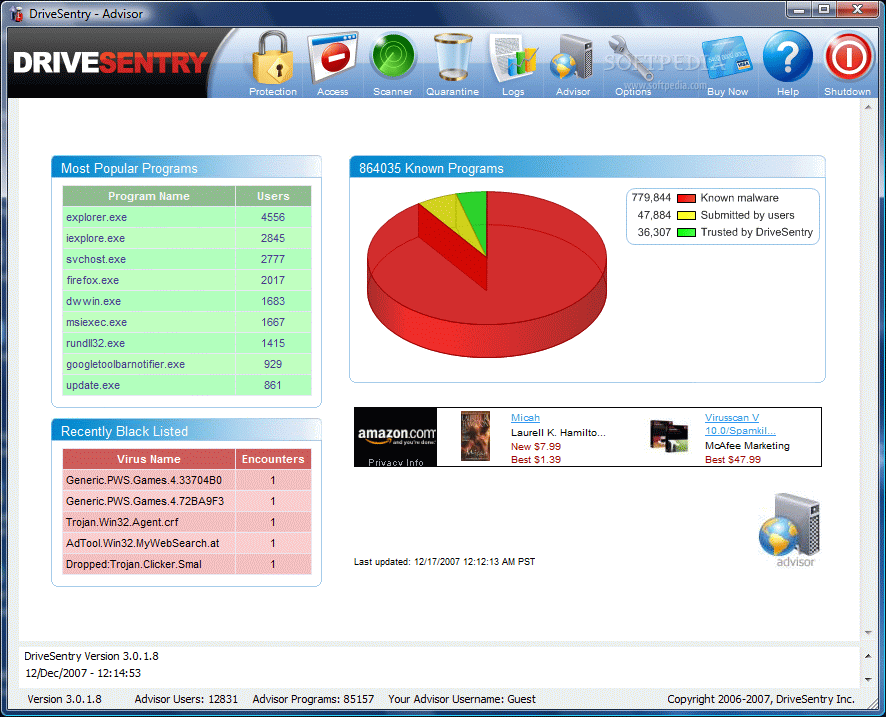
Even with all these detection method, the future of existing malwares are still supposedly brighter than those of current PC protection method. Some security vendors suggests a new protection method called 'whitelisting' to be proactively added to the range of PC protection. In whitelisting, security software basically allows only the good stuff, while denying the unknown or bad stuffs. It is a hot issue, with some security companies now attempting to adopt the practice. One company which successfully adapted 'whitelisting' as a major line of protection is DriveSentry.


DriveSentry is a security company founded in 2005 and based in both the UK and the US. The company believes that whitelisting is the true future of antivirus technology and strives to provide users a solution which can protect them against zero-day attacks and undiscovered exploits. It is interesting to note that the company does NOT rely on heuristic based detection, but purely on whitelisting based detection combined with signature based protection. The company creates database of threats added with another list of known good programs in their antivirus to ensure that users are protected against the unknown and be informed over the known.


DriveSentry is known for two of its currently existing software products, DriveSentry Antivirus and Drive Sentry GoAnywhere. DriveSentry Antivirus is a free, non-commercial antivirus equipped with a virus scanning engine and whitelisting technology for protection against virus, spyware and rootkits. DriveSentry GoAnywhere is a portable antivirus specially designed for USB disk protection against virus, spywares and rootkits and it operates completely on a USB drive. Recent updates to these two software includes a new cloud version of DriveSentry Antivirus and a new AES encryption function for DriveSentry GoAnywhere.


DriveSentry Antivirus v3.1 currently supports Windows 2000, XP, 2003 and Vista. GoAnywhere v1.02 support similar operating system with Antivirus while its supported devices includes external hard drive (portable disk), USB drive (pendrive), flash memory and even MP3 players.


To download DriveSentry Antivirus v3.1, click on the download link.

To download DriveSentry GoAnywhere v1.02 for a 30-day trial, click on the download link.

To visit the DriveSentry official website, click here.

To learn more about whitelisting technology, you can read this article.
Read more >>

Review Digital Plexus

I do not know how well this blog is doing unless there are feedbacks. Please do leave a review or two with us on how you think about Digital Plexus, its authors or the qualities of the posts. Good and bad comments are all welcomed, but please avoid posting rude/obscene comments that are not helpful to any of us working on this blog:

Disclaimer:

This blog is dedicated for the benefits of those who seeks experiences, knowledge or information in the computer, IT news, technology and software & hardware area. Digital Plexus cannot control how readers use the information, including any fraudulent conducts, illegal activities or deeds as regard by the law. Therefore, Digital Plexus & its authors shall not be liable to any damages caused by readers who misuse the information provided.

Digital Plexus utilizes information from many sources, including personal experiences of authors. Digital Plexus will never claim credits or ownership rights regarding the information it used in the blog, except for the raw articles posted on the blog - those are original materials written by the authors of Digital Plexus itself after the compilation of various information and/or experiences.

Followers

  © Blogger templates 'Neuronic' by Ourblogtemplates.com 2008

Back to TOP